What Are the Real Benefits of ERP for Business?

Enterprise resource planning (ERP) software is not new, yet many mid-size companies still run their business on disconnected tools: a finance system here, a warehouse platform there, and a CRM that talks to neither. That setup stops scaling sooner than most expect.
This article covers the practical benefits of ERP for business, the deployment choices that affect them, and what implementation involves.
What Is an ERP System?
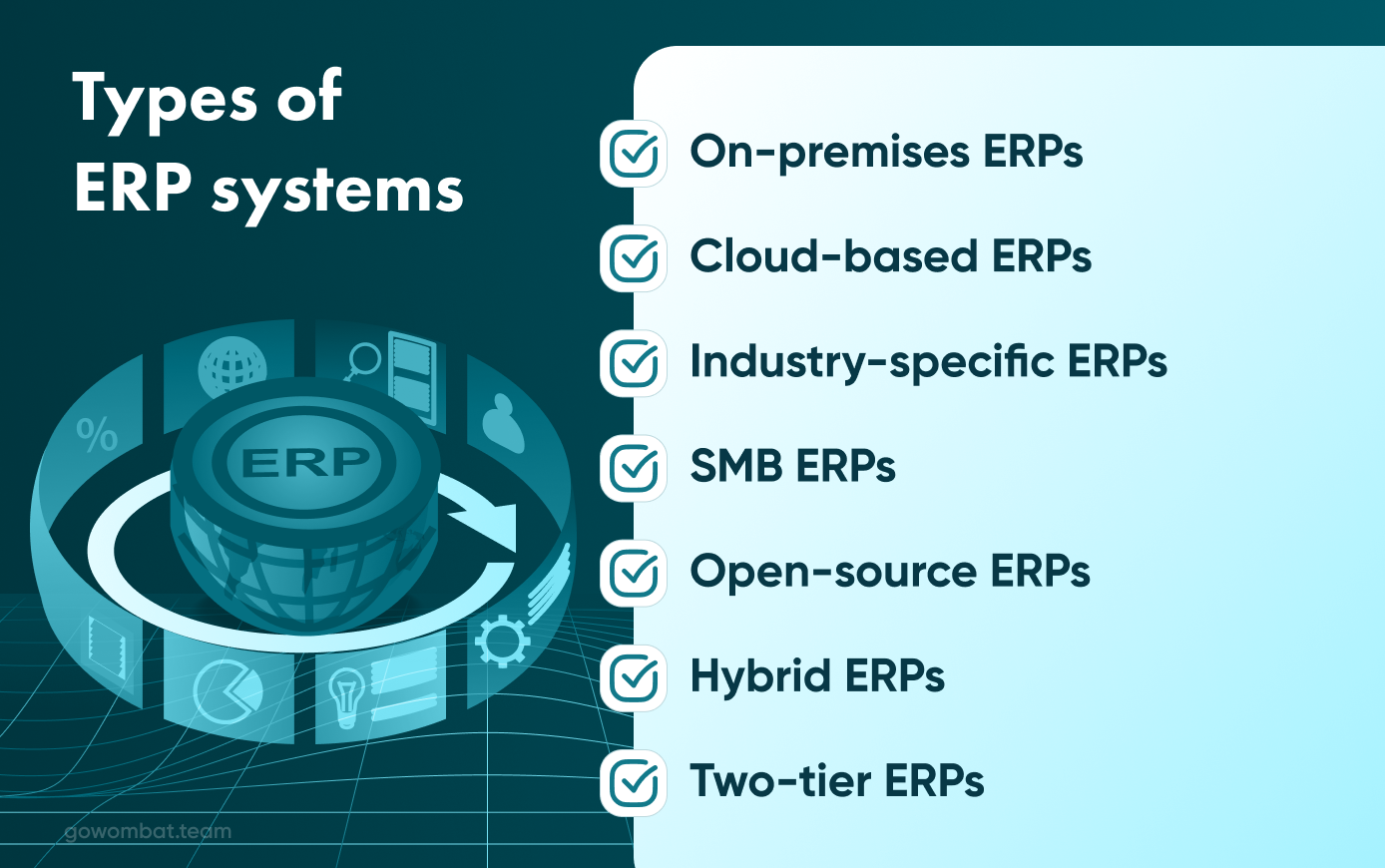
An ERP system connects finance, supply chain, HR, sales, operations and customer service in one platform. Data entered in one part of the system is immediately visible in the others, with no exports, no end-of-day sync and no departments working from different versions of the same spreadsheet.
Many current ERP platforms add AI modules on top: demand forecasting, detection of financial anomalies, and automatic procurement when stock falls below a threshold. Companies that already use business intelligence and data visualisation tools benefit because ERP gives those tools consistent, current data instead of exports from three different systems.
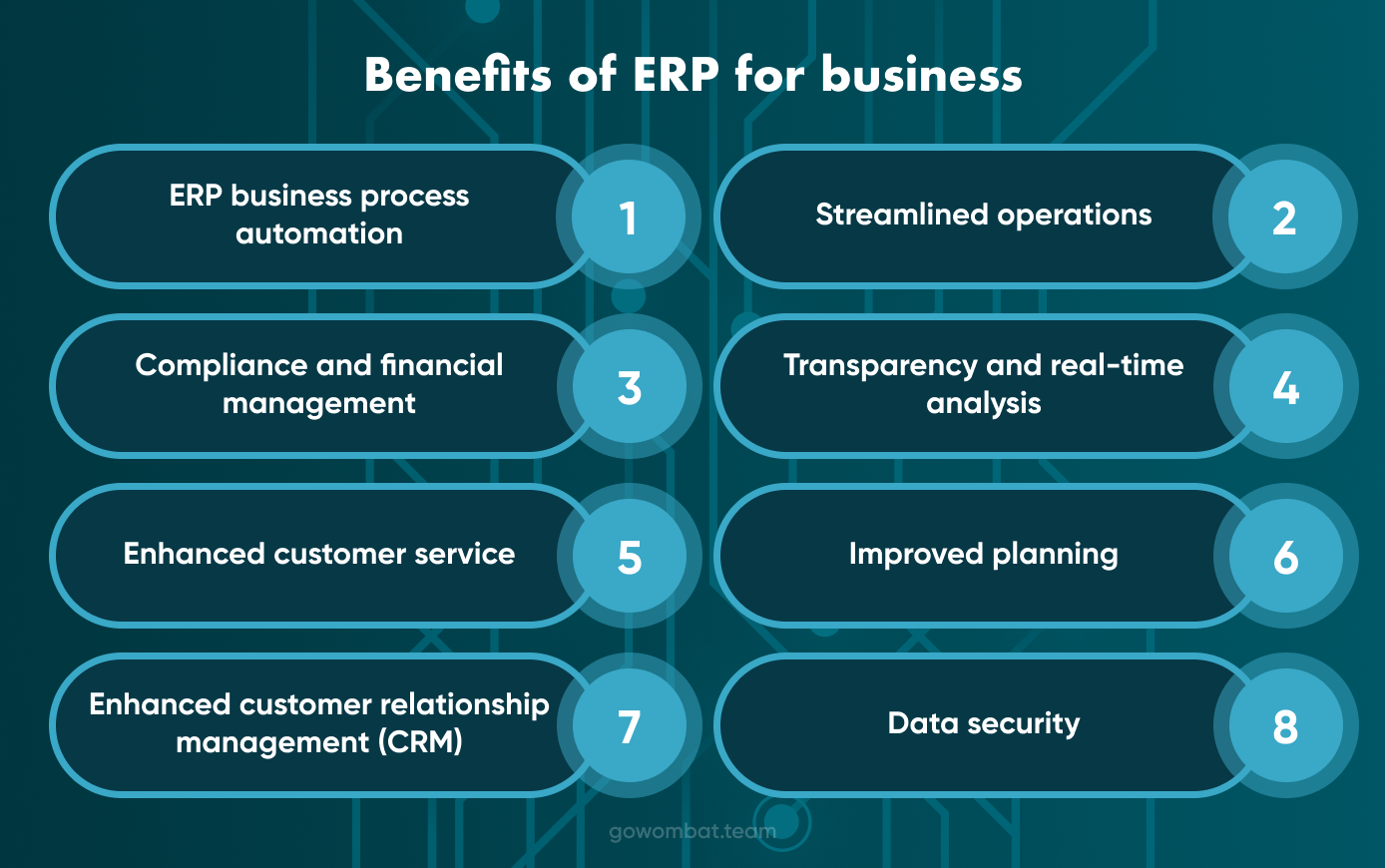
Key ERP System Benefits for Business Operations
Here is what the main benefits look like in day-to-day operations.
Operational Efficiency and Process Automation
In many mid-size companies, order processing works like this: sales logs the order, the warehouse gets an email, and finance finds out eventually. If someone is on leave or an email gets missed, the order stalls and the account manager starts chasing.
ERP removes that chain by connecting the systems. An order comes in, inventory adjusts, the warehouse pick list is generated, payment is scheduled and the customer gets a notification. Nobody has to relay information. This is integration rather than advanced automation: the tools simply share data.
A manufacturer running separate platforms for production, inventory and accounting spends a lot of staff time reconciling data before any analysis can begin. According to Panorama Consulting Group's 2026 ERP Report, more than half of organisations improved key business processes after implementing ERP, and higher productivity and efficiency was the benefit respondents realised most often.
Real-Time Data and Smarter Decision-Making
In most mid-size businesses, the data problem is timing, not volume. Reports arrive a day late, are built from exports that don't quite match, or come from an old copy of a spreadsheet.
ERP doesn't create new data. It makes existing data visible in real time across the business, without anyone having to pull a report.
In practice, a sales rep checks live stock during a call and commits to a delivery date they can meet. A finance director checks the cash position mid-month instead of waiting for month-end. An operations manager sees a production line falling behind schedule while there is still time to act.
Connecting ERP to business intelligence tools takes this further: from knowing what is happening now to forecasting what is likely to happen next.
Financial Control and Compliance
In many mid-size businesses, finance works across unconnected tools: one platform for accounting, another for expenses and a third for payroll. Month-end close becomes a multi-day consolidation exercise instead of a review of numbers that are already assembled.
ERP puts revenue recognition, tax calculations, multi-currency transactions, intercompany accounting and audit trails in one place. Jurisdiction-specific rules can be built into the workflow instead of being applied afterwards by someone who has to remember them.
A professional services firm operating in several European countries has to handle local tax rules, different reporting standards and group consolidation at the same time. Without ERP, that usually means local accountants, manual exports and a lot of email. With ERP, these processes run in one system and the consolidated view is available without manual assembly.
In regulated industries, the case for ERP rests on audit trails and consolidated reporting rather than on cost savings.
Improved Customer Service and CRM Integration
Poor customer service is often blamed on staff attitude. More often, the person trying to help doesn't have the information in front of them.
A client calls about an order. The rep checks one system, then another, sends an internal email and comes back with a partial answer. The information just wasn't where it was needed.
ERP with CRM integration puts order history, delivery status, invoices, previous complaints and payment terms on one screen, so the rep can answer straight away. Patterns also become visible: an account that has gone quiet, or a client whose last three deliveries were late.
For businesses with complex order cycles, such as construction, field services and manufacturing, this helps keep accounts that took a long time to win.
Data Security and Centralised Control
Each tool a business adds brings its own access policies, backup setup and patching schedule. Five tools mean five separate things to get right, and in practice some get less attention than others.
ERP brings this under one framework. Access is role-based, so people see what relates to their function. Every change is logged, and recovery processes are the same across departments.
For healthcare providers, finance firms and legal practices, this is what regulators expect. For other businesses, it means fewer systems to secure.
Cloud ERP vs On-Premise: Which Model Fits Your Business?
The usual framing is that cloud is cheaper and on-premises is more secure. That is not wrong, but it leaves out too much to help with the decision.
Cloud ERP runs on the vendor's infrastructure: you pay a subscription, and the vendor handles maintenance, updates and backups. Products such as SAP S/4HANA Cloud and Microsoft Dynamics 365 have matured to the point where the feature gap with on-premise deployments is small for most standard use cases. NetSuite was built for the cloud and has no on-premise version. For a company without a large IT team that wants to start without a major capital outlay, cloud is the obvious starting point.
On-premise means a higher upfront cost and in-house maintenance, but you control the data environment entirely, and customisation can go down to the code, not just configuration. Companies in heavily regulated sectors, or with workflows a SaaS platform can't accommodate, often find on-premise pays off over a longer horizon despite the higher entry cost.
In a hybrid setup, sensitive data and critical processes stay on-premises while HR, CRM and field operations move to the cloud. The architecture takes more managing, but it matches how many businesses already work.
The right choice depends on what your IT team can handle, how unusual your workflows are, and what compliance actually requires rather than what it is assumed to require.
How ERP Improves Business Operations Across Industries
The logic is the same in every sector; how it plays out is not. The examples below are typical scenarios rather than named client projects.
Manufacturing
Take an automotive parts manufacturer with several production lines and two warehouse sites that schedules production from a system fed by a nightly inventory export. By morning, the numbers are already hours old. When actual stock doesn't match the plan, lines stop while someone counts stock and updates the spreadsheet.
With ERP, production planning uses live inventory data, and procurement requests are generated automatically when stock falls below set thresholds. That means fewer emergency orders and fewer line stoppages caused by inventory mismatches.
The factory floor stays the same; what changes is how accurately the information that runs it reflects reality. Read more about ERP for manufacturing businesses.
Oil and Gas
In asset-heavy industries, failures usually cost far more than prevention would have. That is the main problem ERP addresses in oil and gas.
A field services company working across several sites needs equipment status, maintenance records, compliance documentation and project costs visible across all locations. Without a connected system, the information exists but is scattered, and maintenance gaps appear because nobody has the full picture.
A custom ERP built for this environment schedules maintenance from actual usage data rather than fixed intervals, and generates compliance reports from operational records instead of assembling them by hand before an audit. The specifics of ERP in oil and gas differ enough from generic enterprise software that significant customisation is usually needed.
Healthcare
A private healthcare group with several clinics faces coordination problems that grow with every new site. Patient records are held separately at each clinic, supplies are ordered locally, and finance is consolidated manually at group level, often weeks later.
ERP gives the group a connected view. Patient data is available where it is needed, with access controls in place, supply replenishment follows usage patterns, and financial reporting consolidates in real time. The compliance requirements around healthcare data, access controls, storage, and audit trails are embedded in the system rather than being a separate process someone has to remember to follow.
Wholesale Distribution
Consider a distributor with hundreds of suppliers and client accounts whose fulfilment runs on a warehouse system with no connection to sales. To check an order status, a customer service rep has to call the warehouse.
With ERP, orders, fulfilment, returns and supplier payments run in a single system. Response times improve because the information is available where it is needed, and stock discrepancies that used to surface only at a physical stock-take show up in real time, before they affect a shipment.
ERP Implementation: What to Expect
ERP projects that go badly rarely fail because of the software. They fail because the organisation wasn't ready: requirements were vague, the data was in worse condition than anyone admitted, and change management was left until after go-live.
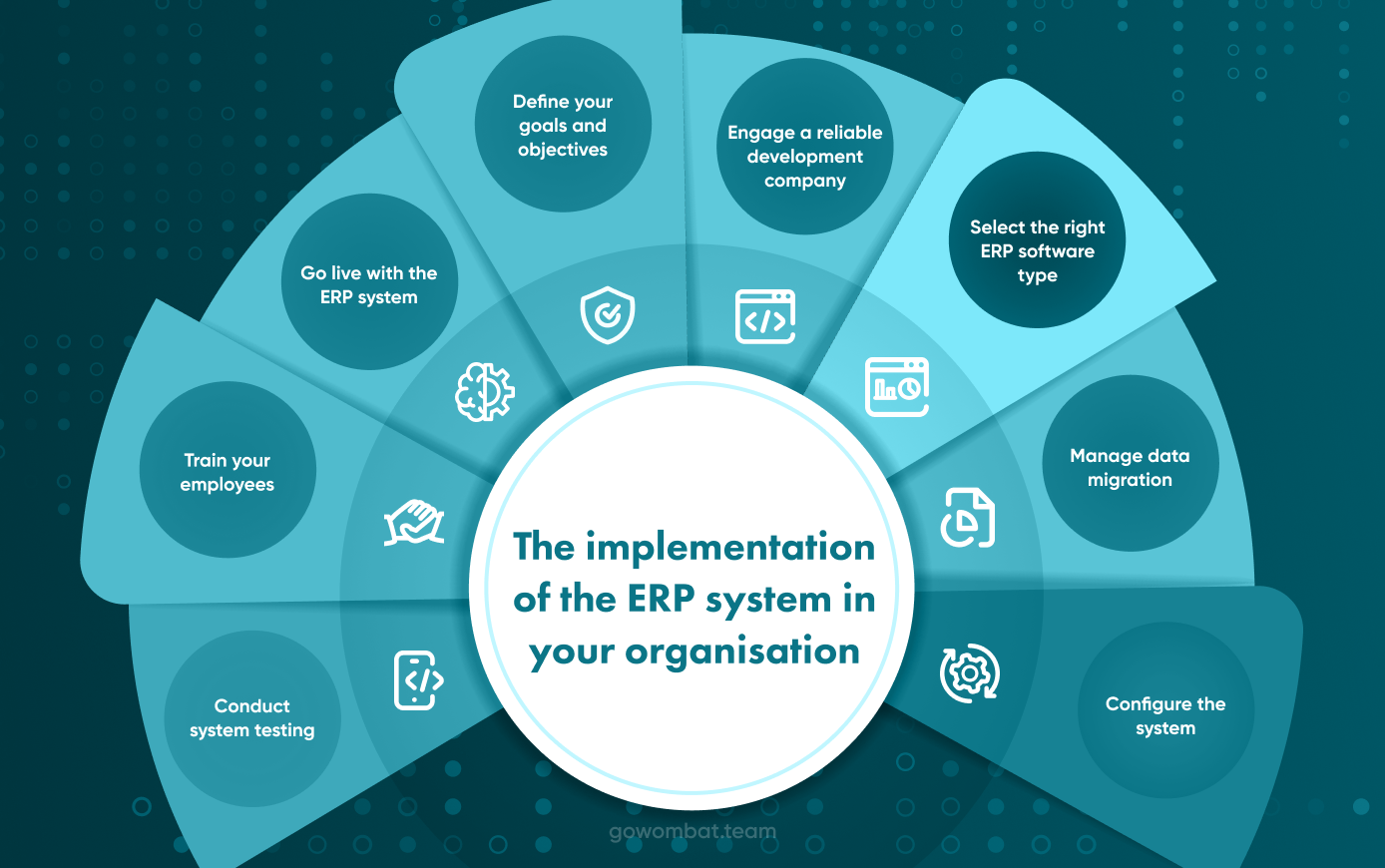
A realistic timeline for a mid-size business:
Discovery and scoping: four to six weeks. Requirements are documented, processes mapped and software selected. This is also where success criteria must be defined, because vague goals produce vague outcomes.
Data migration: three to eight weeks, and often longer than first estimated. Cleaning, structuring and validating legacy data before it moves into the new system is slow work, but time spent here reduces problems after launch.
Configuration and development: six to sixteen weeks, depending on the depth of customisation and the number of modules.
User acceptance testing: three to four weeks, using real workflows rather than demo scenarios. Every department that will use the system needs to take part.
Training: two to four weeks, by role. Generic platform walkthroughs lead to low adoption; people need to learn how their own job works in the new system.
Go-live and stabilisation: four to eight weeks after launch. Things will need adjusting. A successful go-live is not one where nothing breaks, but one where issues are fixed without disrupting the business.
Added up, these phases come to 22–46 weeks, or roughly five to ten and a half months for a mid-size rollout. Enterprise projects take longer. For comparison, Panorama Consulting Group's 2026 ERP Report gives a median project timeline of nine months.
A team that understands your operations, not just the platform, makes a difference to how that timeline plays out. Go Wombat builds custom ERP around what the business needs rather than what a standard configuration can approximate. Send us a brief.
Conclusions
ERP doesn't fix strategic problems. A business without clear processes won't get clarity from software; it will get faster chaos.
What ERP removes is the drag that builds up as a business grows: coordination overhead between departments, manual reconciliation between disconnected systems, and decisions based on out-of-date data.
The consistent, current data that ERP provides also makes later investments in analytics or AI more effective.
If your current tools have stopped scaling with your business, Go Wombat builds custom ERP solutions designed around how your operations work.
FAQ
What are the main ERP system benefits for business?
ERP brings finance, HR, supply chain, sales and customer service into one platform. The practical gains are process automation, real-time visibility, stronger financial control, compliance built into daily workflows, and better customer service because teams see complete account information. For mid-size businesses, the first change is usually less manual reconciliation and faster decisions.
How does ERP improve business operations day to day?
It mostly removes coordination overhead. When a sales order comes in, inventory, production and finance update automatically, without anyone relaying information between systems. Managers work from live data, and customer service can answer questions without calling other departments.
Cloud ERP or on-premise: which suits a mid-size company better?
For most mid-size businesses, cloud is the more practical starting point: lower upfront cost, faster deployment and vendor-managed maintenance. On-premise suits businesses with deep customisation needs, strict data sovereignty requirements, or compliance requirements that hosted infrastructure can't meet. Hybrid works for organisations that need elements of both. The answer depends on IT capacity, regulatory context and your processes.
How long does ERP implementation take?
Roughly five to ten and a half months for a mid-size business, from scoping to stable operations; Panorama Consulting Group's 2026 ERP Report gives a median of nine months across projects. Plans most often underestimate data migration: cleaning and structuring legacy data before it moves to the new system. Rushing it causes post-launch problems that are hard to fix once you are live.
What industries benefit most from ERP?
Sectors with complex operations gain the most: manufacturing, wholesale distribution, healthcare, professional services, construction, and oil and gas. What they share is many departments coordinating, a high cost when errors occur, and large volumes of transactional data to track accurately. The more moving parts a business has, the more ERP has to offer.
Is custom ERP better than off-the-shelf software?
Off-the-shelf platforms work well for businesses with standard workflows and an IT team that can manage ongoing configuration. Custom ERP is the stronger choice when processes are highly industry-specific, when you need deep integrations that standard platforms don't support well, or when configuring an off-the-shelf product starts to approach the cost of building your own.
Share and subscribe to our blog
Related articles

How Business Intelligence in ERP Improves Your Company in 2026
What business intelligence adds to an ERP system, the BI tools commonly paired with ERP in 2026, how to implement BI step by step, and the usual obstacles.

How to Build an ERP System: Modules, Integration and Development Steps
Plan an ERP project: compare custom and ready-made software, choose the first modules, and map integration, testing and rollout requirements.
-blogCardMobile-480x320.webp)
What Does a Custom ERP System for Oil and Gas Need in 2026?
What a custom oil and gas ERP system needs to include in 2026, when to build rather than buy, and an eight-step development plan.

How can we help you ?