



What Is Software Documentation? Types and Best Practices for 2026

Every decision in a software project needs a record somewhere. That record is software documentation, and it is easy to underestimate until someone has to change code nobody remembers writing.
Projects run more smoothly when the team keeps a thorough record, from the original requirements to the maintenance steps. Without one, you end up with a bug nobody can explain, a deployment nobody dares touch, and client questions nobody can answer with confidence.
This guide defines software documentation, lists the types worth keeping, and sets out best practices for creating and maintaining it, including current tools and standards.
What is software documentation?
Software documentation is the collection of information and artefacts that describes a software project to everyone with a stake in it: the client who commissioned the work, the developers who build and maintain it, and the people who use it day to day.
Put simply, documentation is the record of everything about an application: its architecture, its logic, and the details a developer needs before touching production code. Good documentation starts during discovery and grows with every phase that follows: development, testing, deployment, and beyond.
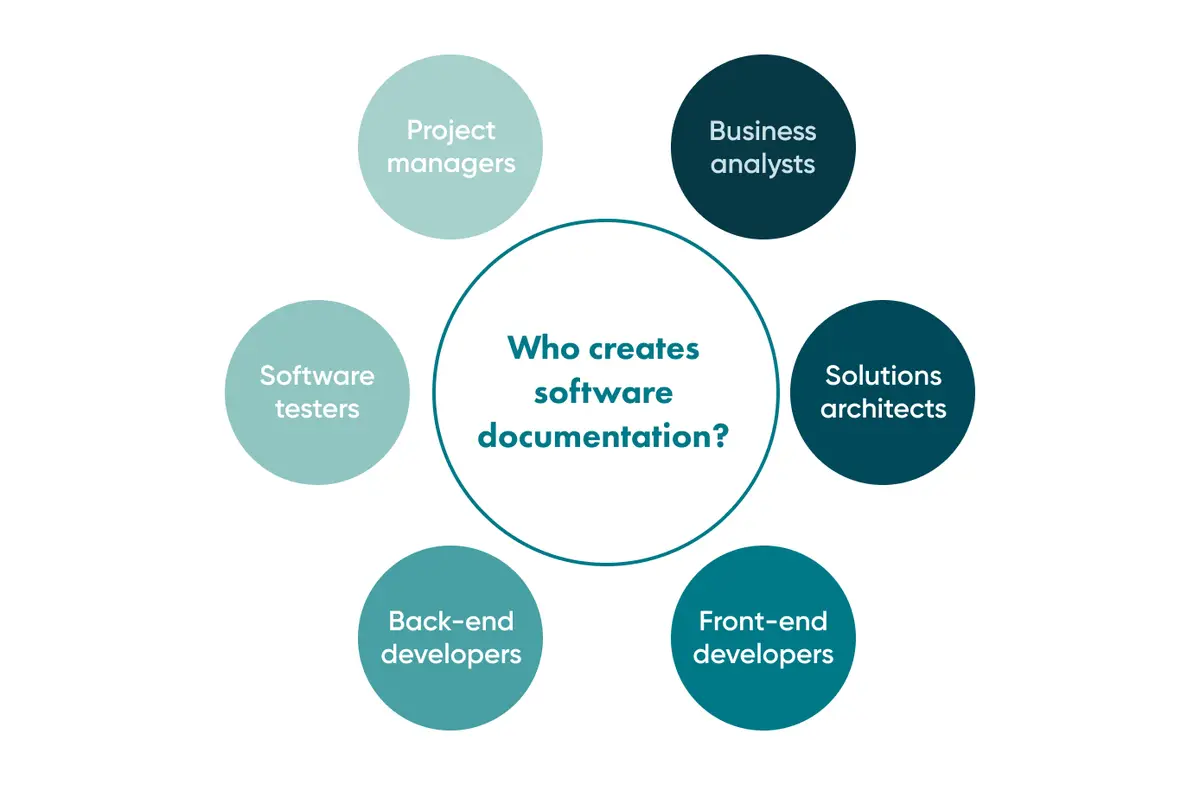
Documentation is a shared responsibility. Business analysts, solutions architects, front-end and back-end developers, testers and project managers all own part of it.
Each contributor owns their own artefacts and keeps them on schedule. Most companies can't fund a dedicated documentation team, and one rarely works as well as ownership spread across the people doing the work. Requirements documents usually come together before a project starts. Process documentation builds up as development continues.
Why does software documentation matter in 2026?
Software rarely stays still. It gets patched, upgraded, and occasionally rebuilt from scratch when the underlying assumptions change. The same product can exist as a SaaS platform, a web app, and a mobile app, each built through a different route to the same outcome.
None of those changes is easy without a clear picture of how the system was put together in the first place.
On paper, thorough documentation sounds like overhead that a team can skip under deadline pressure. In production, it's usually the fastest way back to a working system once something breaks.
The cost of undocumented systems
Some failures make the cost of missing documentation impossible to ignore. In August 2012, Knight Capital deployed new trading software across eight production servers, but one server didn't receive the update and kept running a dormant function from 2003. Nobody had documented that the old code was still live on that server, and the company lost roughly 440 million US dollars in 45 minutes once markets opened.
That is an extreme case, but the underlying lesson holds at any scale: undocumented systems eventually become unmaintainable ones.
Most teams document the happy path carefully. That's exactly the part of the system nobody needs help understanding six months later.
AI-assisted coding raises the stakes
Generative coding assistants make writing code faster, but they do not make explaining it any easier. A function generated in seconds still needs a human-readable explanation of why it exists and what happens if someone changes it. Teams that use AI-assisted development without documenting the reasoning behind generated code build the same kind of blind spot that caught Knight Capital out.
Is software documentation ever finished?
No. Documentation has to change every time the code does. In agile and scrum teams, working software takes priority over paperwork: if you are ever forced to pick, choose a working function over a fully documented system.
Teams practising agile documentation favour lightweight artefacts that change with each sprint over one upfront specification that goes stale within weeks. Documentation should capture the architecture and the goals and leave developers room for judgement.
Types of software documentation
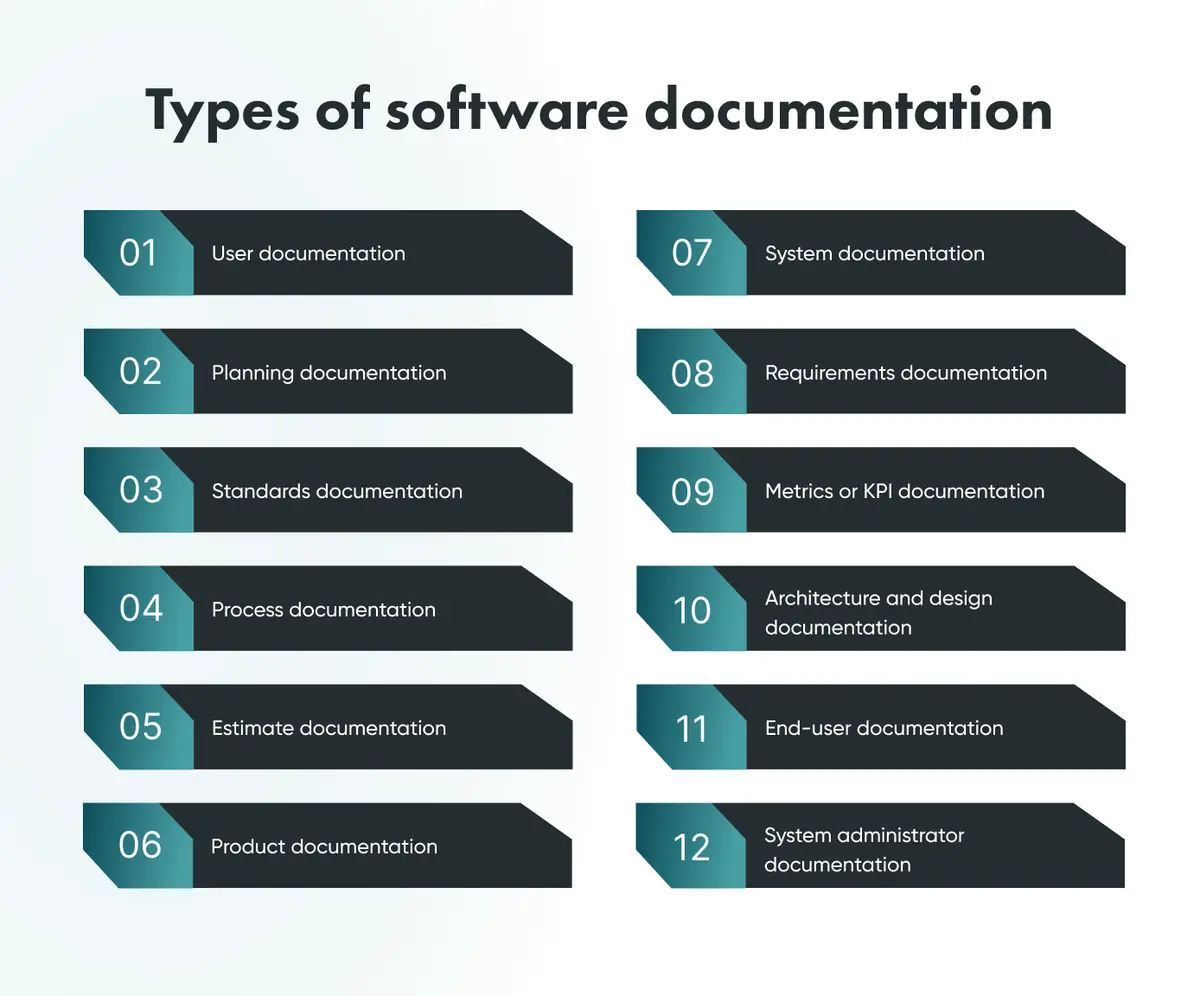
Documentation can be visual, written or both; what matters is the information it carries. Text combined with diagrams usually produces the clearest artefacts. The types below cover what most teams need.
Every piece of documentation belongs to a stage of the software development life cycle (SDLC): planning, analysis, design and development, implementation, testing, or maintenance. Here's how the most common types map to those stages.
Planning and requirements documentation
Planning documentation
A detailed plan for how the development process will run is agreed upon before serious work begins.
Requirements documentation
Requirements documentation, sometimes called software requirements documentation, outlines what the software needs for its creation, operation, maintenance, and long-term success.
Estimate documentation
Covers the estimation process: the cost of each step and a summary of the overall budget. It matters most on a lean MVP development project, where the scope is deliberately small and budget certainty counts.
Process and standards documentation
Process documentation
Describes each task inside the development process, plus how the process fits together as a whole.
Standards documentation
Sets out the technical, security, and other standards the team must follow throughout the build.
Metrics and KPI documentation
Tracks the key performance indicators used to measure how the platform performs once it's live.
Product and system documentation
Product documentation
Describes the software product as it exists today, not as it was originally scoped.
System documentation
Names each component in the system and explains what it does and how it contributes to the whole.
Architecture and design documentation
Gives UX professionals and architects an overview of the interface and structure, so the design stays logical as the product grows.
User-facing documentation
User documentation
Educates the people who will use the software day to day, often through walkthroughs and similar resources.
End-user documentation
Covers what end users need directly: operating system requirements, installation steps, and support contact details.
System admin documentation
Gives system administrators what they need to keep things running: troubleshooting steps, FAQs, and tutorials for handling setbacks.
The Diataxis framework: a modern lens on documentation types
Most of the categories above map onto SDLC stages. Diataxis, a framework created by Daniele Procida, a former Django core developer now Director of Engineering at Canonical, sorts documentation by what the reader is trying to do instead. The Diataxis website features testimonials from teams at Cloudflare, Gatsby and Vonage.
Tutorials
Step-by-step lessons that get a newcomer to a working result, learning by doing rather than by reading theory first.
How-to guides
Task-focused instructions for solving one specific problem, written for someone who already knows the basics.
Reference
Dry, accurate, and complete: the material developers scan quickly to look up a fact, not to learn a concept.
Explanation
The reasoning behind a decision or a system: useful for understanding context rather than performing a task.
Combining the SDLC-stage categories with the Diataxis view produces documentation that serves both the project timeline and what the reader needs.
What goes inside a documentation artefact?
Regardless of size or format, most artefacts share a handful of building blocks.
Activity, event, and directional flow
An activity is a single task or a cluster of subprocesses that make up part of a business process. An event starts, stops or otherwise affects that activity: a received message, a deadline or a condition being met. Directional flow is the logical path through the workflow, usually shown with arrows in a diagram.
Decision point, link, and role
A decision point is the moment a subprocess splits into separate paths, exclusive, parallel, or supporting, that can later merge back together. A link connects to another process map, inside the same application or across to a different platform. Role describes which person or group owns a given part of the process, usually mapped directly to real job titles on the project.
If you want a second opinion on your documentation strategy before a project starts, see Go Wombat's discovery phase services.
Common documentation formats
Some formats describe a solution, others map a sequence of actions, and others turn a written explanation into something visual. The software documentation examples below show how differently the same information can be presented.
Flowcharts and value stream mapping
Flowcharts and Value Stream Mapping (VSM) trace a process step by step, useful for spotting where time or value gets lost along the way.
Data flow diagrams and UML
Data flow diagrams and Unified Modelling Language (UML) diagrams describe how information moves through a system and how components relate to one another.
BPMN, BRD, and other structured notations
Business Process Model and Notation (BPMN) maps business processes visually. A Business Requirement Document (BRD) captures what the business needs in prose and structured detail. Beyond those two, teams sometimes reach for Integrated DEFinition (IDEF) notation, Input-Guide-Output-Enabler (IGOE) diagrams, or SIPOC diagrams (Suppliers, Inputs, Process, Outputs, Customers) when a process needs a specific lens.
How do you test and validate documentation?
Documentation is only useful if it is correct, so validation deserves its own step, with the same discipline as quality assurance in software engineering.
Proofreading and stakeholder interviews
Every document should be proofread, ideally by a technical expert and a native-level speaker of the language it's written in. Stakeholder interviews, both internal and external, confirm the documentation matches reality rather than intention.
Business-objective adherence and sign-off
Documentation should be checked against the client's actual business requirements, not internal assumptions alone. Pairing this with formal software testing services closes the loop between what the documentation promises and what the system does. Stakeholders, internal and external, sign off at the end of each SDLC stage before the team moves on.
There's no single correct way to validate documentation. Pick a method, commit to it, and hold the team to the standard you set.
Software design and architecture documentation
A software design document captures decisions before any code exists. Design and architecture documentation need particular attention now that teams often draft them with AI assistance, because generated text needs a structure defined by people.
Architecture documentation with arc42
arc42 is a free, open-source template for architecture documentation, created by Gernot Starke and Peter Hruschka in 2005. It structures architecture documentation into twelve sections, from constraints and context to risks and technical debt, so it works as a ready-made software documentation template.
Aligning with ISO/IEC/IEEE 26514:2022
For teams that need a formal standard behind their user-facing documentation, ISO/IEC/IEEE 26514:2022 sets out requirements for designing and developing information for software users, covering the full lifecycle from planning through to delivery. Following a recognised standard also helps when clients in regulated sectors evaluate custom software development partners.
API documentation in 2026
APIs sit at the centre of most modern software, which makes API documentation one of the highest-value artefacts a team produces.
What Stripe gets right
Stripe's API documentation is often cited as a benchmark: runnable code examples, a three-column layout that keeps prose and code side by side, and error documentation that explains what went wrong and why. Few teams need that level of polish, but every API reference should show working examples, not only parameter lists.
OpenAPI 3.2 and machine-readable specs
The OpenAPI Specification, currently version 3.2.0 (released in September 2025), lets teams describe an API in a machine-readable format that tools can turn into interactive docs, client SDKs and test suites automatically. Pairing a written explanation with a machine-readable spec reduces the drift that happens when documentation and code fall out of sync. Go Wombat's guide to integrating APIs covers this in more depth.
Technical documentation vs user documentation
The two are often confused, and the difference matters when deciding who writes what.
Technical documentation | User documentation | |
|---|---|---|
Audience | Developers, architects, QA | End users, customers |
Purpose | Explain how the system works internally | Explain how to use the system |
Typical format | Architecture diagrams, API references, code comments | Walkthroughs, help centres, onboarding guides |
Example | An arc42 architecture document | A step-by-step onboarding guide |
How to write documentation that holds up
These software documentation best practices matter more than any template, whether you are three weeks into a project or three years in.
Write for the reader, not the system
Documentation written for a machine's logic, rather than a human reader's, tends to get skipped. Write for the person who'll open the document at 2 am during an incident, not for the abstract structure of the codebase.
Keep sentences short
Long, clause-heavy sentences slow readers down. Short, direct sentences read faster under pressure, which is when most documentation gets opened.
Version and date every artefact
An undated document is a liability. Add a version number and a last-updated date to every artefact, so anyone reading it knows immediately whether it still reflects the live system.
Before the project starts, agree on a documentation approach and stick to it, whether that means an artefact at every SDLC stage or something lighter. Go Wombat's business analysis work can help define that approach.
Software documentation tools for 2026
Software documentation tools fall into three main groups: docs-as-code platforms, collaborative wikis and API-specific tools.
GitBook and Mintlify (docs-as-code platforms)
GitBook and Mintlify both let teams store documentation in the same repository as their code, version it through git, and publish it automatically on merge. That workflow keeps documentation closer to the code it describes, which cuts down on drift.
Confluence and Notion (collaborative wikis)
Confluence and Notion suit documents that several stakeholders, not only developers, need to edit at the same time. Both support real-time collaboration and give the whole team one place to look.
Swagger (API-specific)
Swagger tools, including SmartBear Swagger (previously sold as SwaggerHub), generate interactive API documentation directly from an OpenAPI specification, keeping reference docs and the actual API contract in sync.
Maintaining documentation as your software evolves
Software changes constantly, often through the same IT support and maintenance work that keeps the underlying system running. Documentation has to keep pace, or it becomes misleading.
Docs-as-code workflows
Treating documentation like code, stored in version control and reviewed through pull requests, makes maintenance a normal part of the development cycle rather than a separate chore nobody schedules.
Compliance-driven maintenance
Some documentation now carries legal weight. Under Article 11 of the EU AI Act, providers of high-risk AI systems must draw up technical documentation before the system goes to market and keep it updated throughout its lifecycle. Under Article 113 as amended by the Digital Omnibus, these obligations apply from 2 December 2027 for high-risk systems listed in Annex III and from 2 August 2028 for those covered by Annex I. For teams already managing GDPR and compliance documentation, Article 11 adds a parallel, AI-specific obligation rather than replacing existing data protection paperwork.
Whichever techniques you use, the real requirement is ownership: developers, architects, and analysts each taking responsibility for their own artefacts, rather than waiting for someone else to update them.
Key takeaways
Without software documentation, the next team to touch the code pays for the previous team's shortcuts. AI-assisted development, docs-as-code tooling and, in some sectors, regulation have changed which types are worth keeping and which standards are worth following.
Teams that treat documentation as a shared, ongoing responsibility rather than a one-off deliverable find it much easier to upgrade, rebuild and hand off their software.
Frequently asked questions
What is the difference between technical documentation and user documentation?
Technical documentation explains how a system works internally, aimed at developers, architects, and QA teams. User documentation explains how to operate the system, aimed at the people using it day to day.
Which software documentation tools do professionals use in 2026?
Teams commonly combine a docs-as-code platform such as GitBook or Mintlify for developer-facing content, a collaborative wiki such as Confluence or Notion for cross-functional documents, and Swagger tools for API references.
How do you create technical documentation for a software project?
Start with the SDLC stage the document belongs to, define the audience, and choose a format, prose, diagram, or both, that suits how that audience will actually use the document. Validate it through proofreading and stakeholder review before treating it as final.
What is the best software documentation template to start with?
For architecture documentation, arc42 offers a proven, free structure. For general project documentation, a template that maps directly to your SDLC stages tends to work better than a generic one borrowed from another team.
How is AI changing the way teams write and maintain documentation?
AI tools speed up drafting and can generate a first-pass explanation of code, but they still need a human to confirm accuracy and context. Docs-as-code workflows help keep AI-assisted documentation synced with the codebase it describes.
Do EU AI Act rules require software documentation for AI systems?
Yes, for high-risk AI systems. Article 11 of the EU AI Act requires providers to produce technical documentation before market launch and keep it updated. After the Digital Omnibus amendments, these obligations apply from 2 December 2027 for Annex III systems and from 2 August 2028 for Annex I systems.
Share and subscribe to our blog
Related articles

A Comprehensive Guide to EHR System Development
What an EHR system is, how it differs from an EMR, its benefits and must-have features, and the steps to build a custom EHR for your practice.

Cloud Data Security: Protecting Sensitive Data
What cloud data security covers in private, public and hybrid clouds, why the Capital One, Uber and Accenture incidents happened, and the controls that prevent them.

Business Analysis in Software Development: Full Guide
What business analysis in software development is, why it matters, the six BABOK knowledge areas and the techniques our analysts use.

How can we help you?

