



How to Build an ERP System: Modules, Integration and Development Steps

As a company grows, it adds departments, people and handovers between them, and it gets harder to see what is going on. An ERP system brings finance, purchasing, production, sales and HR data into one place, so work between departments can be tracked and controlled.
Plan Before You Build
An ERP project touches every department, so it needs a plan. This article covers how to build an ERP system, not why; for the basics, read our article about ERP, its types and its effect on working processes.
Every ERP system is built around one company's processes. Below we describe how we at Go Wombat develop ERP software in Python, and one project where we built a CRM on top of a client's existing ERP.
Custom Solution vs Ready-Made - Which One To Choose?
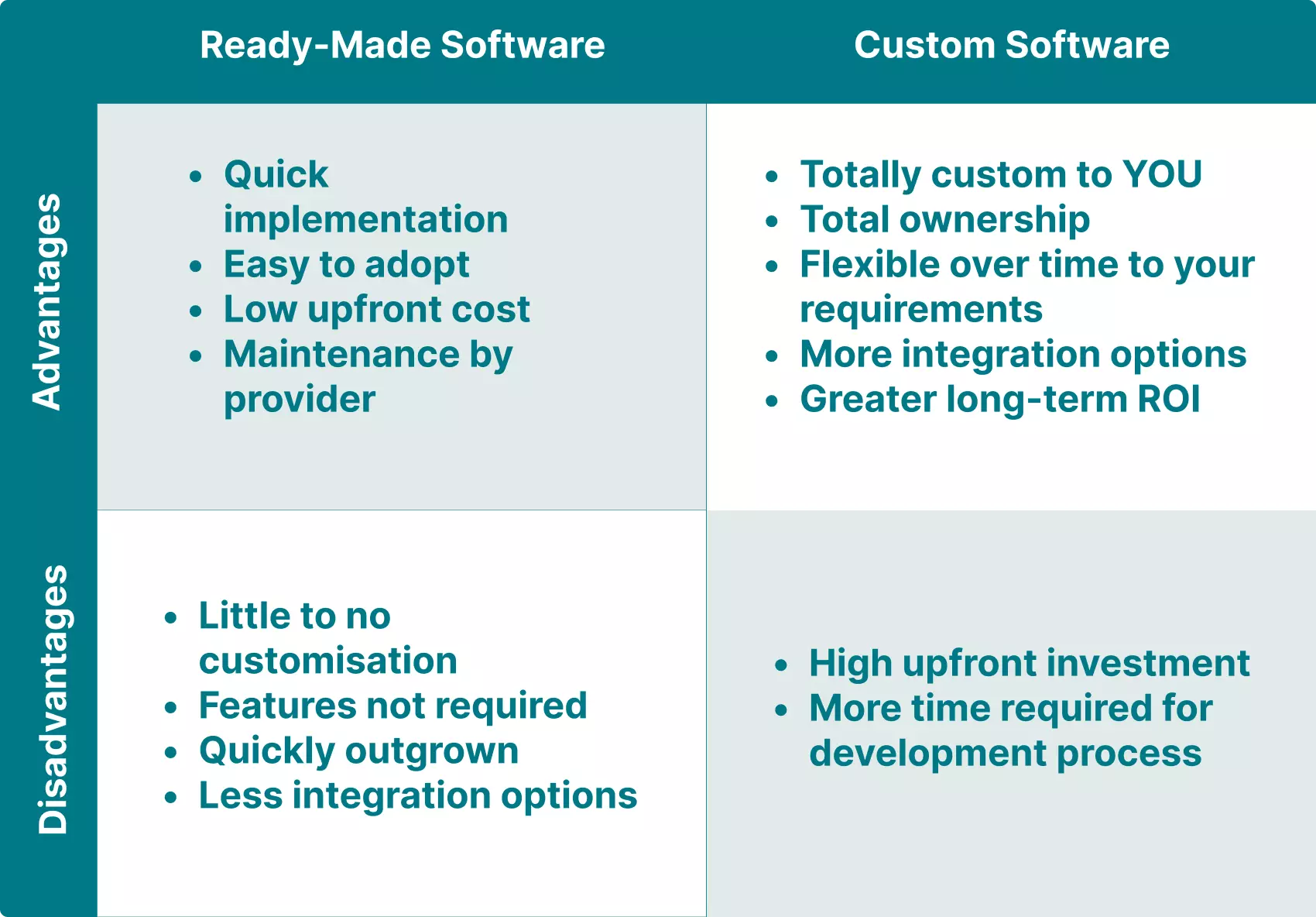
Ready-made ERP software is widely available, but it may not cover all your requirements. Here is how custom and ready-made systems compare on scalability, cost and deployment.
Scalability
Software-as-a-Service (SaaS) and other cloud-based ERP systems scale well, and their vendors keep adding functionality. They also come with many features you may never use.
A custom ERP system is built around your requirements and grows the way your business needs. A SaaS product can be configured, but it rarely fits an organisation's processes exactly.
Cost
A ready-made ERP system costs much less to start with, because you buy a finished product. The catch comes later: if your business outgrows it, you may have to buy add-ons or pay to re-engineer the system, which means paying twice.
A custom solution needs a bigger initial investment and takes longer to set up. In return, it is designed around your current and future business goals, without features you don't need and with room to expand. Custom ERP pays off when your processes don't fit standard modules; for standard accounting or HR, a SaaS ERP is usually cheaper to start.
Deployment
Off-the-shelf ERP software deploys faster, because it isn't adapted to your internal processes: it is a best-fit product, not an exact fit.
A custom ERP system takes longer to integrate with existing software, deploy and set up for all business processes. Once it is running, it matches the way your company works.
To build your ERP system from scratch, contact us.
Features For An ERP System
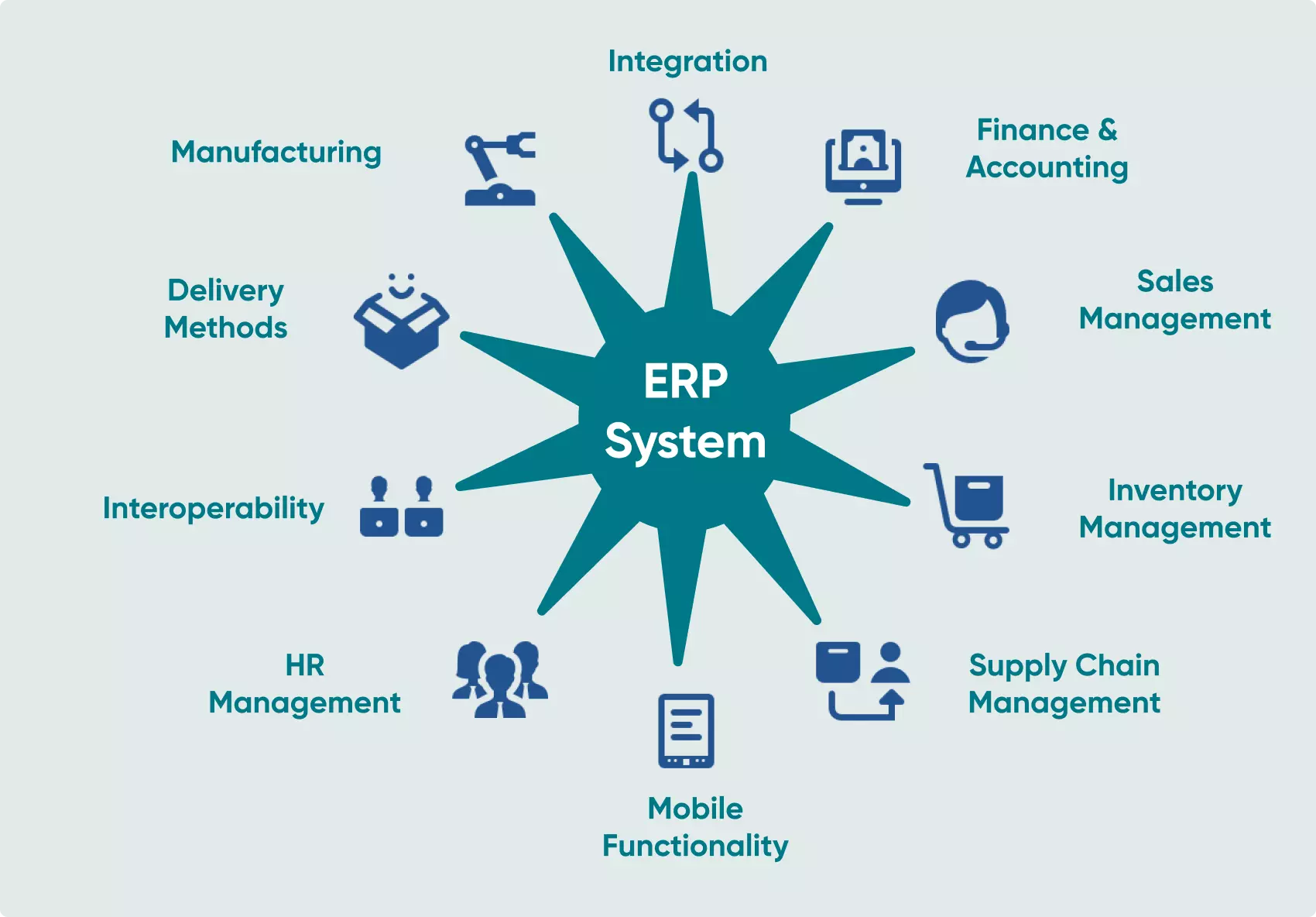
Next, define the functionality. These are the most common modules; your business may need others.
Financial module
The finance and accounting module handles the accounting department's work: financial records, tax returns and balance sheets, up-to-date financial data and forecasting.
Purchasing module
This module covers the goods and materials you buy. If you manufacture laptops and need spare parts, your procurement team uses it to list suppliers, automate quotation requests and process the quotes that come back.
Manufacturing module
The manufacturing module works with the purchasing module: it helps plan production and estimate the raw materials and spare parts needed. It also tracks current output and forecasts potential output.
CRM module
The CRM module stores customer data, communication history and purchase history for the sales team, which makes sales work faster and improves customer service.
For more detail, read our article on the advantages of a CRM system.
Order management
Order management lets everyone who handles orders track their status, process, fulfil and dispatch them, and follow each order through delivery so nothing gets lost.
Inventory management
Inventory management tracks the stock a company buys for its own use. Combined with the purchasing module, it lets you track each item in the organisation and estimate inventory costs.
Efficiency and HR management
The HR module stores information on current and potential employees for HR managers and recruiters. It generates offer letters and job descriptions, tracks sick days, and monitors performance so managers can help employees develop.
Reporting module
Reports on business operations help owners and managers make decisions and spot weak points before they cause damage. Depending on your requirements, the reporting module can produce clear reports with graphs and charts.
Marketing module
The marketing module automates campaigns. It usually covers campaign lists, customer segments built from CRM data and basic attribution.
Data analysis
The data analysis module processes data from all business operations and feeds the reporting module. With up-to-date data every day, specialists can act on problems as they appear.
Steps To Create Your ERP System
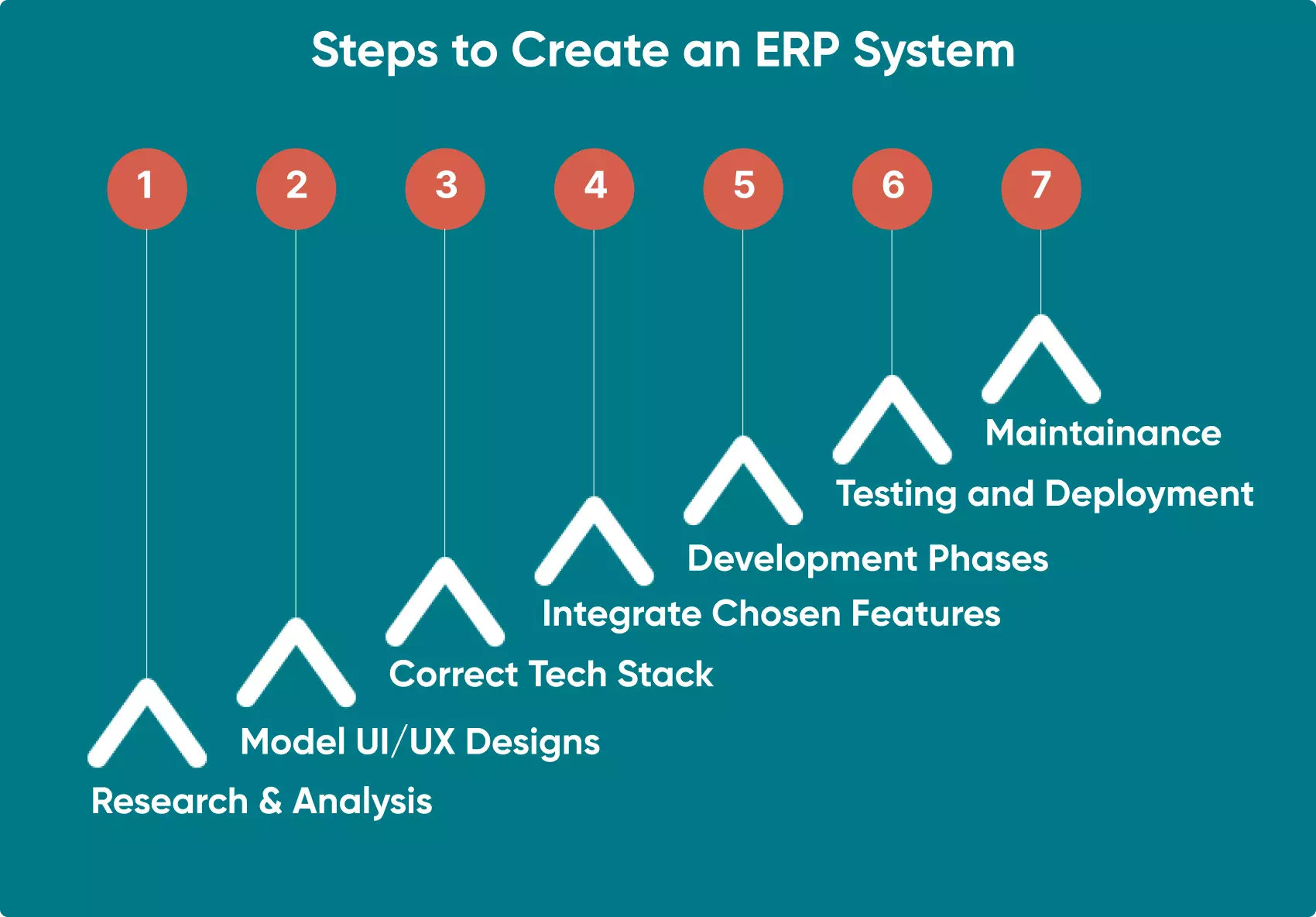
How We Do It at Go Wombat
Below is the process we follow, with a short case study: a CRM we built on top of a client's ERP.
Choose A Trustworthy Contractor
First, find a reliable development company. Outsourcing is usually the more cost-effective way to build an ERP system from scratch. Review platforms such as Clutch.co and GoodFirms list outsourcing companies with client reviews, so you can compare vendors before you contact them.
Business Analysis And Estimate
When a client contacts us, we collect the requirements: what kind of ERP they need and which problems it should solve. Our specialists may also run a business analysis to choose the best approach to development.
Then we prepare an estimate with a detailed task list, timeline and cost. The final cost depends on the contract type. A Fixed Price contract sets the price upfront, and it doesn't change. A Time and Material contract, which we recommend, lets you change requirements during development.
We work in sprints and demo the result to the client after each one, so feedback goes into the next sprint straight away.
Creating UI/UX Design For Your ERP
For an ERP built from scratch, our UI/UX designers start by analysing the scope of work. ERP systems are large, so we prepare a blueprint of the system together with the client before designing screens.
Each department has to be able to work with its modules without friction, so the designers pay particular attention to colour schemes and navigation.
Choosing the Tech Stack
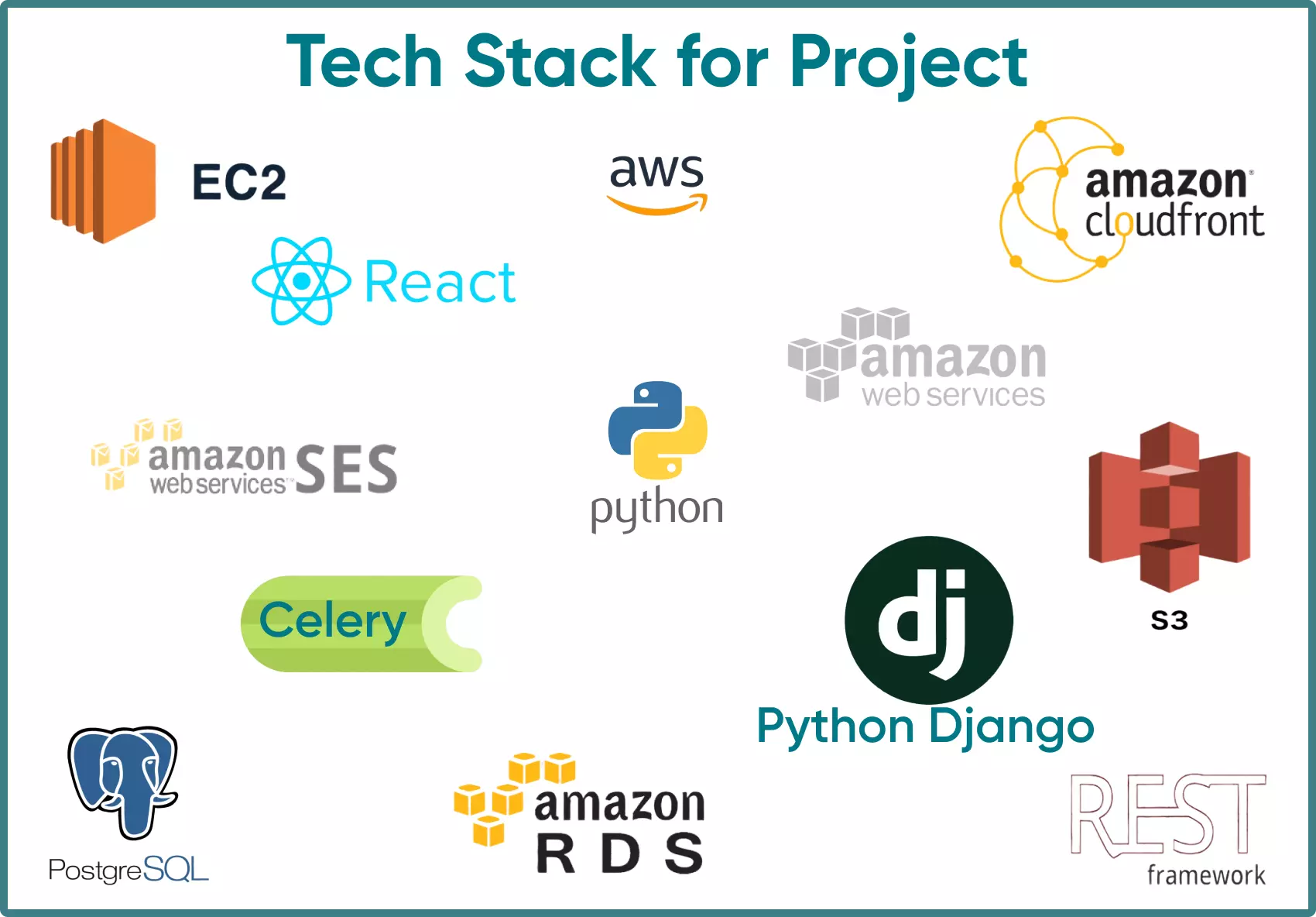
At Go Wombat, Python is our core language. We build back ends in Python with the Django framework, and front ends in React, Vue.js or Angular.
For a web-based ERP system, the first decision is hosting: in the cloud or on a local server. It depends on the project, but we usually recommend the cloud.
For the database we mostly use PostgreSQL, but the final choice depends on the project's requirements.
How We Built A CRM System For An ERP
Our client sells agricultural equipment, semi-trailers, braking systems for towed vehicles, tow bars and trailer components. It has many regional offices and sells through dealerships.
Customers can order equipment in a specific configuration: for example, a trailer with three axles and a fuel tank, which the company then assembles.
The company already had an ERP system for internal processes, but it wasn't used for the interaction between dealers and customers. Reaching individual dealerships took customers too long, many processes were manual, and building a quote for a customer's parameters took about 20–30 minutes. As a result, customers received pricing and availability information only after 2–3 days.
Our task was to make ordering and quote building faster and more convenient. We did this by building a CRM and integrating it with the existing ERP.
The client couldn't stop using its ERP, because many operations ran there, so we built a CRM on top of it that improved communication between the company and its dealerships. Customers got a personal account where they could see ratings and prices for the equipment they needed, check warranties, submit warranty requests and read manuals. They could select a configuration in a few seconds and see the price almost immediately. Invoices and orders were stored in the personal account.
Features and tech stack
The CRM receives orders and invoices from the ERP system and generates quotes from them. Its main features are user management, a quote builder, PDF generation for quotes, and receipt of orders and invoices.
Building the CRM took more than a year. At the time of writing, the client was testing it and collecting feedback for further changes.
ERP System Integration
A new ERP system has to be integrated with your existing infrastructure. The development team will need access to legacy apps and databases to configure the system correctly and to deploy it in your environment together with your technical team.
Testing
After development, our QA engineers run integration, functional, performance and security testing, and check how the modules work with each other.
We also recommend a beta test in which your own employees use the new ERP system.
Contact us for a confidential discussion of your project.
Conclusion
In the dealer case above, pricing went from taking 2–3 days to appearing almost immediately. That is the kind of gain to plan an ERP project around.
Go Wombat has more than 10 years of experience in software development, including ERP and CRM systems.
Contact us to discuss your ERP project or get a consultation.
Share and subscribe to our blog
Related articles

Five Business Automation Trends to look out for in 2022
Five technology trends for business process automation in 2022, taken from Gartner's list: cloud-native platforms, composable applications, hyperautomation, AI engineering and generative AI.

10 Key Software Development Trends In 2022
The software development trends we expected to matter most in 2022, from automation and AI to blockchain and PWAs, and what they mean for custom software.
Why Is the Digital Twin of an Oil Refinery the Most Complex AI System You Will Ever Build?
Why a digital twin of an oil refinery is so hard to build: seven interdependent layers from physics simulation to control system integration, results from Cosmo Oil's refinery digital twin, a look at Honeywell's planned digital-twin work at the Dangote refinery, team and data prerequisites, and why projects fail.

How can we help you?

