Why Do SaaS Tools Hit a Wall at Scale and When Should You Build Your Own?

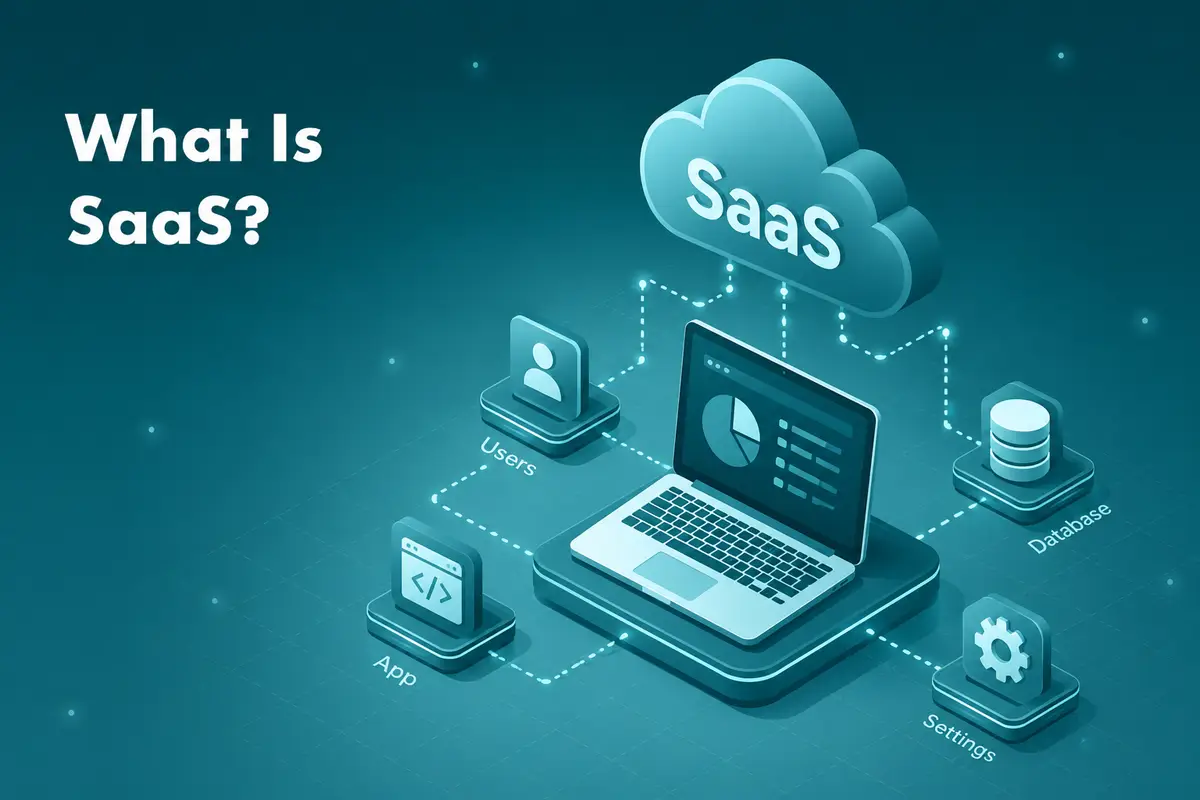
Picture a company that grows from 30 to 80 people in eighteen months (an illustrative scenario, not a real client). Its SaaS project management tool bills per seat, its CRM charges by contact tier, and its data warehouse throttles API requests past a certain query volume, which rules out real-time reporting at its new scale.
At 30 people, the stack works. At 80, it costs more, covers less, and generates workarounds that take engineering hours nobody budgeted for.
Per-seat and per-tier pricing makes a SaaS tool cheap to adopt and expensive to scale. That is the SaaS ceiling.
If your SaaS bill is growing faster than your headcount, it is time to compare it with the cost of building.
The SaaS Promise vs the SaaS Reality
SaaS won the 2010s on a straightforward argument: skip the infrastructure, avoid the upfront licence fee, get continuous updates without a procurement cycle. For many companies that was a good deal: faster to deploy than custom software, easier to maintain and cheaper to start.
The model was not designed for a company that grows fast and develops its own operational complexity along the way.
Most SaaS pricing and architecture decisions reflect an idealised customer: steady headcount, predictable workflows, moderate data volumes. The product was built around the median. If you have grown past the median, you are now paying for a product that fits someone else.
A SaaS scalability ceiling is where that gap becomes expensive. The platform's standardised feature set, pricing model, or data architecture no longer matches how the business actually runs, and the mismatch grows until it shows up as a budget problem, an engineering problem, or both.
The Five Ceiling Triggers
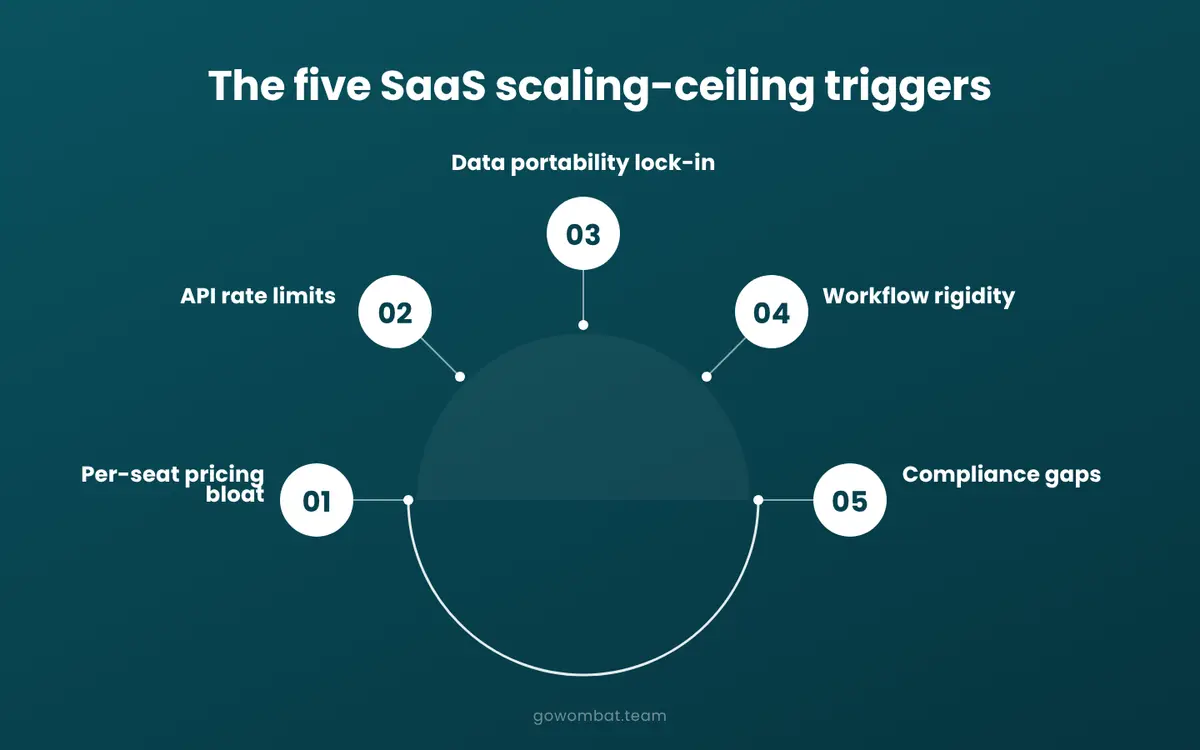
These are the forms it most commonly takes. One trigger alone is manageable. Three or four arriving together is when teams start asking whether there is a better way.
- Per-seat pricing bloat
At 50 users, the per-head cost is an acceptable line item. At 200, it has usually become a meaningful constraint on hiring decisions, which means the software is now influencing how the company grows.
- API rate limits
Platforms throttle requests, and the limits are designed around typical usage patterns, not yours. When your data pipelines hit those limits, you either pay for a higher tier or engineer around them.
- Data portability lock-in
Operational data accumulates in the vendor's proprietary schema. Moving it out is technically possible but rarely straightforward, and often expensive. The longer you stay, the harder it gets.
- Workflow rigidity
Off-the-shelf tools are built for a representative customer. If your processes are specific to your market, your regulatory environment, or how your team works, the software will eventually ask you to change your process to match it rather than the other way around.
- Compliance gaps
Audit trails, data residency requirements, and granular access controls mean regulated industries need customisation that most SaaS vendors either cannot provide or charge heavily for. The standard configuration is rarely the compliant one.
The Klarna Signal
In 2024, Klarna said it had shut down Salesforce and would drop Workday as part of an AI-driven effort to consolidate its data; its CEO later clarified that the company built its own internal stack rather than replacing SaaS with an LLM. The 2024 announcement followed a separate move earlier the same year: an AI customer service assistant that Klarna said was doing the work of roughly 700 agents, which the company projected would improve 2024 profit by around $40 million.
The transition was more nuanced than the headlines suggested. Some tools were swapped for other SaaS products, not custom builds. By mid-2025, Klarna's own CEO said the AI-only customer service push had hurt quality, and the company resumed hiring human agents, a reminder that this kind of shift is rarely as clean as the initial announcement suggests.
Where SaaS Starts to Cost More Than It Saves
The subscription fee is rarely the full cost. That often becomes clear at renewal, when someone adds up what the tool costs to run.
The Real Pricing Maths
Take Salesforce Sales Cloud for a 25-person team. At the Core edition's price on Salesforce's current pricing page, $195 per user per month billed annually, licences alone come to $58,500 a year. Add implementation, a dedicated admin and premium support, and the real cost of that single CRM is well above the sticker price. And that is for 25 people.
Most organisations run dozens of SaaS tools simultaneously, often without anyone tracking the full list, and few have compared the cost of that stack with custom software development built around their own workflows. The useful comparison is the whole stack, not one tool at a time.
The Invisible Engineering Cost
Then there is everything that does not appear on any invoice. When SaaS tools fail to integrate cleanly, engineers write the connective tissue themselves: custom scripts, middleware layers, automation flows that break the next time a vendor updates their schema. This is bespoke software by stealth: built without a proper brief, maintained without clear ownership, and never counted on the balance sheet.
By the time this cost is visible, the workarounds have often become the system.
The Signals That It Is Time to Build
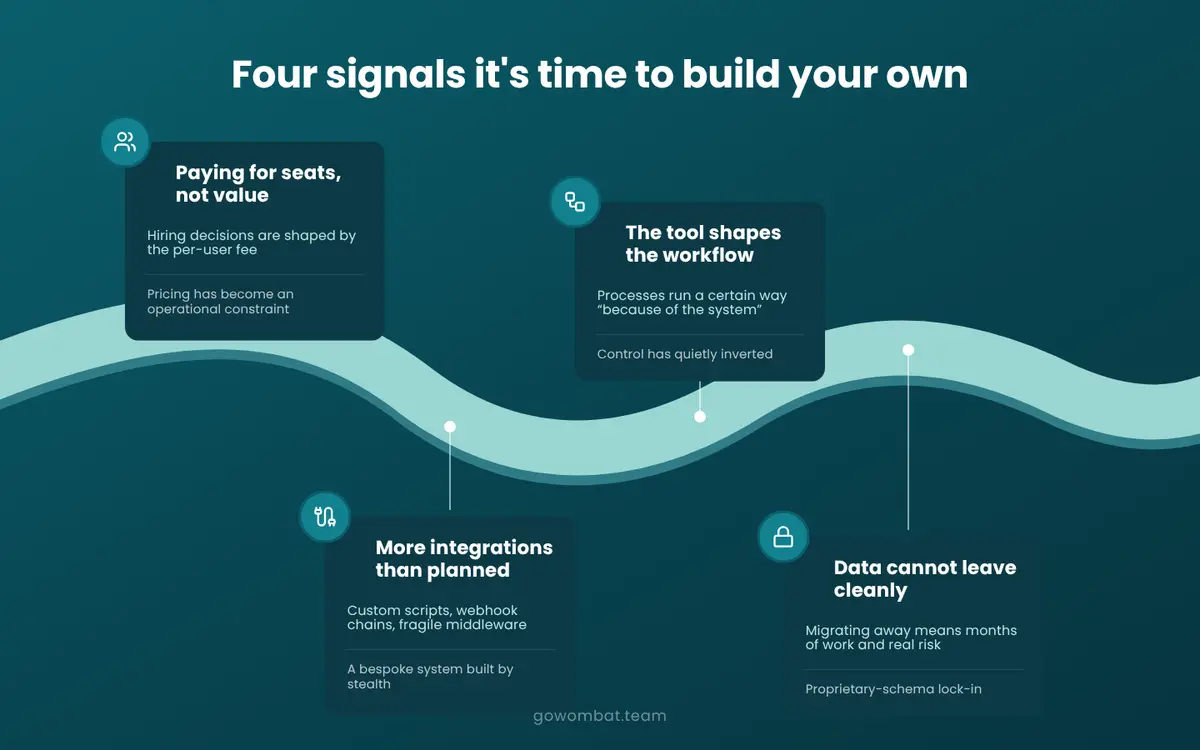
There is no single trigger. Usually several things go wrong at once, and someone asks whether the stack still fits the business. That question starts the custom software development conversation.
Here are four signals worth paying attention to.
Signal 1: You Are Paying for Seats, Not Value
Headcount decisions are being shaped by the per-user fee structure. A delayed hire, a reorganised team, a workaround built to avoid adding another licence: each is a small signal. Together, they mean the pricing model now shapes how the organisation is designed.
Signal 2: Your Workflows Are Shaped by the Tool Rather Than the Business
Someone on the product or operations team explains that a process works a certain way "because of the system." The system was supposed to serve the process; now it directs it, and that rarely gets fixed from inside the SaaS contract.
Signal 3: You Have Built More Integrations Than You Planned
Unplanned integrations are evidence that no single tool covers the actual use case. A few are fine. But once the integration layer (custom scripts, webhook chains, fragile middleware) needs its own maintenance, you are already running a bespoke system. A properly designed web application or business process automation layer would often be cleaner and cheaper to maintain.
Signal 4: Your Data Cannot Leave Cleanly
Ask your engineering team what it would take to migrate away from your primary SaaS vendor. If the answer involves months of work, high cost, and material risk to operations, you are locked in. Data migration from a proprietary schema is usually more involved than teams expect.
When three or more of these signals are present, check whether "SaaS is cheaper than building" is still true for you. It may have been when you started.
A Practical Build-vs-Buy Framework
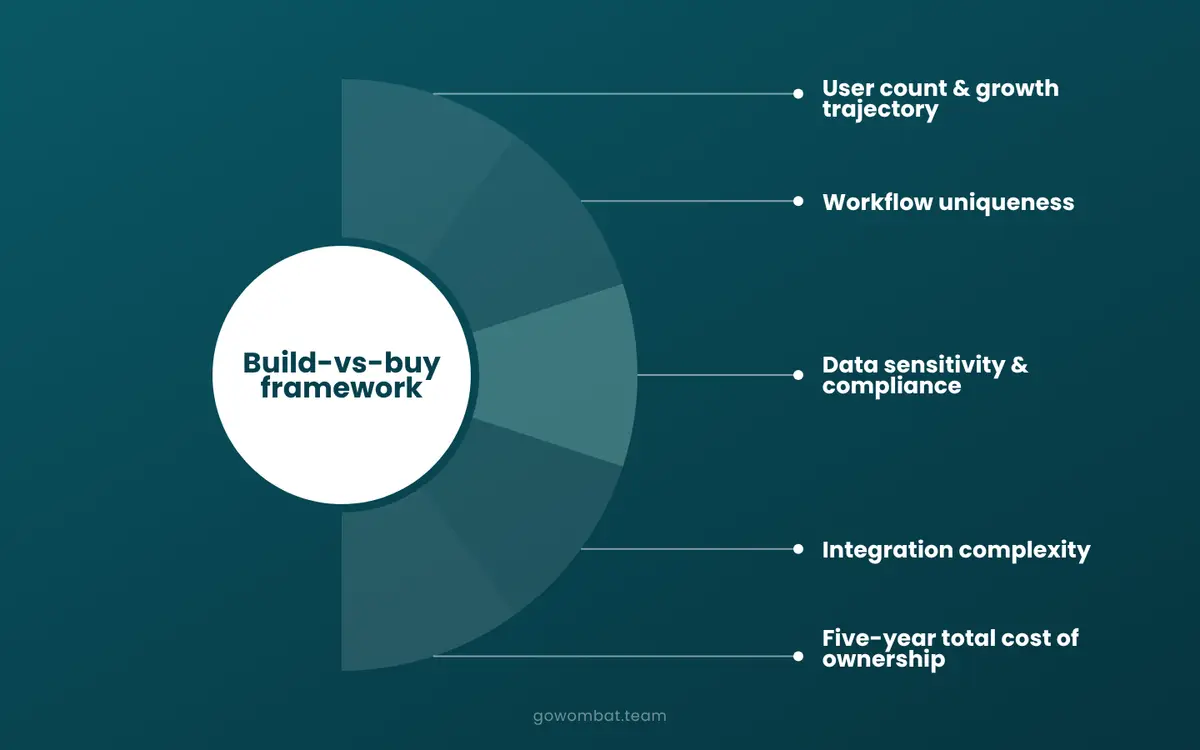
The decision is rarely a clean either/or. Most organisations land somewhere on a spectrum, and the honest answer is usually "build some things, keep buying others." Five dimensions help make that assessment concrete.
Dimension 1: User Count and Growth Trajectory
Under 50 users, SaaS almost always wins: faster to start, lower upfront cost, less risk. Between 50 and 200 users the comparison gets close, depending on the tool and the use case. Past 200 users, or when headcount grows fast enough that the per-seat bill becomes a line item people argue over, the cost structure starts working against you.
Dimension 2: Workflow Uniqueness
If your processes map cleanly onto what a SaaS tool does, custom development is probably not the right call. But teams often find, once they start configuring, that the tool covers most of what they need and the rest is handled with workarounds. The question is whether that remainder is peripheral or operationally central; if it is central, the workarounds become load-bearing.
Dimension 3: Data Sensitivity and Compliance Requirements
Established SaaS vendors typically hold SOC 2 and ISO 27001 certifications. For low to moderate data sensitivity, that is usually sufficient. Where it breaks down is in regulated industries, where the specific controls go beyond what a standard configuration can deliver. GDPR consulting and cybersecurity considerations should enter this analysis early, not once implementation has already started.
A note on regulated sectors
Fintech and healthcare businesses run into this repeatedly. The push toward custom builds in those sectors is about being able to architect around compliance obligations from the start, rather than retrofitting a general-purpose platform to meet requirements it was not designed for.
Dimension 4: Integration Complexity
One to three connected tools is manageable in any stack. Four to ten is where maintenance burden starts to accumulate. Above ten integrations, or where proprietary legacy systems are involved, the integration layer becomes its own engineering problem, and a well-designed custom application is often simpler to maintain than the web of connectors holding the SaaS tools together.
Dimension 5: Five-Year Total Cost of Ownership
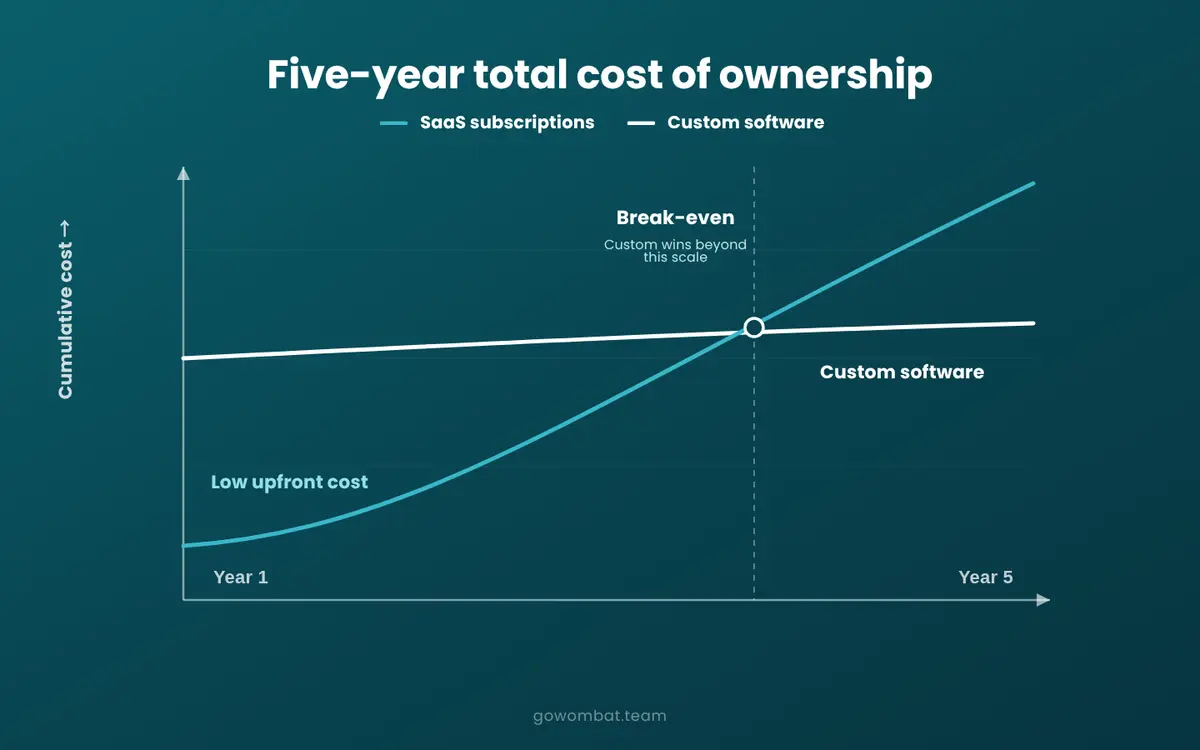
SaaS starts cheap and gets more expensive as usage, headcount, and feature requirements grow. Custom software needs a larger upfront commitment and usually costs less to run over time. Where those curves cross varies by organisation.
A useful rule of thumb: build what differentiates you, buy what does not. Commodity functions (email, payroll, basic HR) rarely justify the investment. Operationally critical workflows that are specific to how your business runs often do.
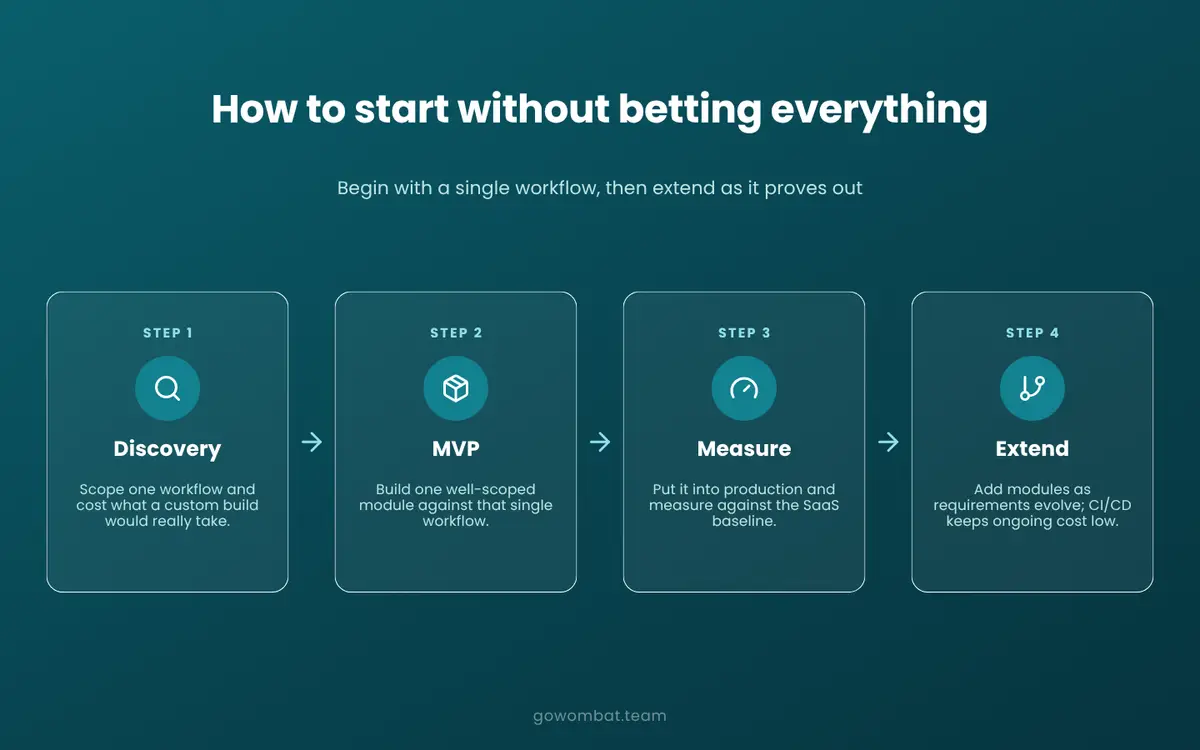
The Cost Question Nobody Asks Correctly
What does custom software development cost? It is the usual first question in a build vs buy software analysis, but on its own it is the wrong one.
The right question is: what is the five-year total cost of each option?
Year-one cost, or licence fee against project fee, gives a misleading answer, because the two cost curves move in opposite directions over time.
Why Business Analysis Changes the Outcome
The scoping and discovery phase is where the five-year cost comparison becomes credible rather than speculative. A structured business analysis engagement produces a detailed scope, a delivery estimate, and a maintenance model, the inputs needed to build a real comparison against the SaaS alternative.
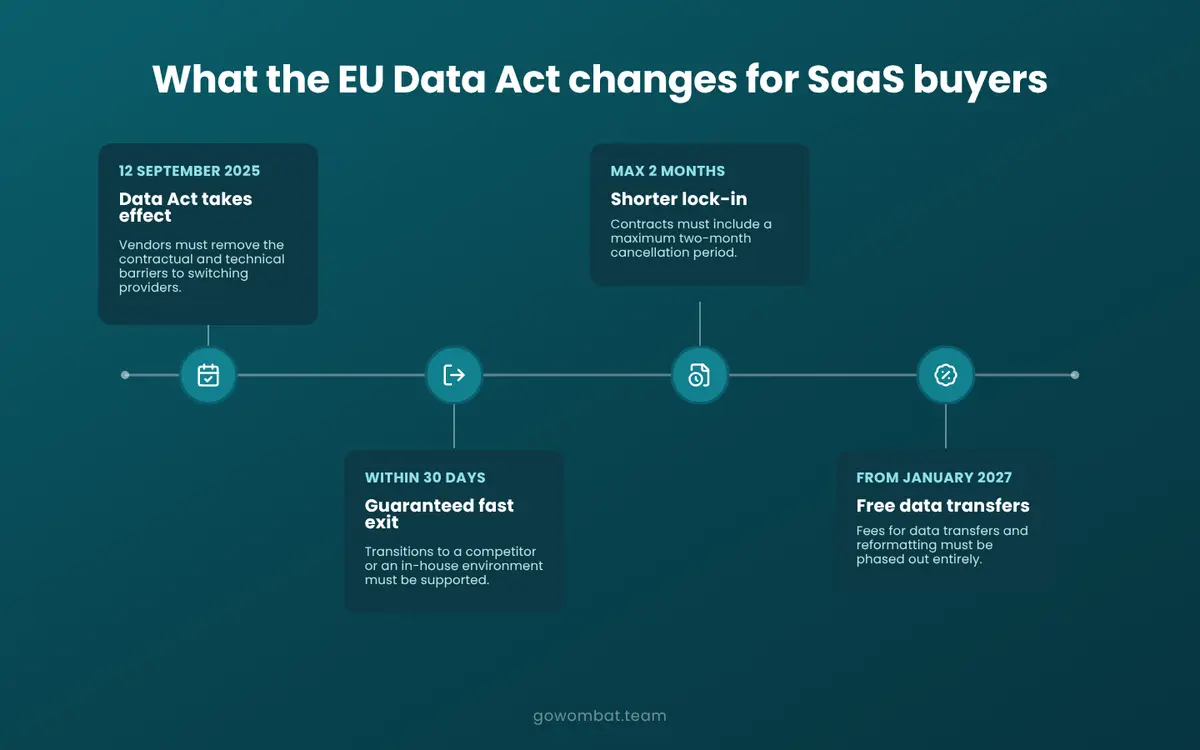
What the EU Data Act Changes for SaaS Buyers
For companies in the EU, the calculation changed in September 2025.
The EU Data Act took effect on 12 September 2025. It requires SaaS and cloud vendors to remove contractual and technical barriers to switching, enable customers to export their data in machine-readable formats, and support transitions to competitors or in-house environments within 30 days. Contracts must set a maximum notice period of two months for starting the switching process. From January 2027, fees for data transfers and reformatting must be phased out entirely.
What This Means for the Build vs Buy Decision
Data portability lock-in, one of the five ceiling triggers described above, is now legally constrained for EU-based buyers, and the contract terms that made switching expensive must comply with the Act. The practical cost of leaving an incumbent SaaS vendor has dropped.
For companies in the Netherlands, Sweden, Denmark and the rest of the EU, this belongs in any contract renewal conversation: the worst-case exit from a SaaS vendor is now bounded by law, which changes the risk side of the build vs buy calculation.
How to Start Without Betting Everything
The main objection to building custom software is risk. A SaaS subscription is reversible. A poorly scoped custom software project is not.
The risk is real, but you do not have to make an all-or-nothing choice.
Start With One Workflow
You do not need to replace your whole SaaS stack at once. Start with a single workflow: the part of your operation where the SaaS ceiling costs most, where the workarounds take most effort, or where the data is most sensitive.
Commission a discovery session to scope what a custom build would actually require and what it would cost. Build an MVP against that single workflow. Measure the result. Extend from there.
What good CI/CD changes about ongoing cost
Maintenance cost is the usual next objection, and it is fair: poorly structured custom software is expensive to maintain. A well-designed CI/CD pipeline from the start keeps deployment and running costs down, and the first build is one well-scoped module, with an architecture that can be extended as requirements change.
The Dedicated Team Model
One way to reduce risk further is to work with a dedicated development team rather than a fixed-scope project. A dedicated team can adapt as requirements become clearer, which helps companies moving from SaaS to custom software for the first time.
Key Takeaways
Four signals suggest the ceiling is close: per-seat pricing shaping operational decisions, workflows shaped by the tool rather than the business, integrations nobody planned, and data that cannot leave cleanly. For EU-based buyers, the EU Data Act has also weakened lock-in as a reason to stay.
The answer comes from a five-year cost model for your own stack and scale, not from a general rule. If any of the signals above are visible, run that analysis before the next renewal.
Talk to our engineers about where a custom build makes sense in your architecture.
Frequently Asked Questions
What are the main disadvantages of SaaS at enterprise scale?
Per-seat pricing grows linearly with headcount, often faster than the value delivered. API rate limits constrain data pipelines at volume. Workflow rigidity forces operational decisions to accommodate software limitations rather than business logic. Data portability lock-in makes vendor transitions expensive. And compliance requirements in regulated industries frequently exceed what a standard SaaS configuration can support without significant additional customisation.
When does it make financial sense to build custom software?
The financial case for custom software strengthens when the five-year total cost of your SaaS stack exceeds the estimated build and maintenance cost of a purpose-built alternative. That tends to happen as headcount grows, when integration complexity is high, or when a core workflow is specific enough that no off-the-shelf product covers it without material compromise. A structured discovery engagement produces a credible comparison before any build decision is committed.
How long does it take to build a custom web application?
Scope drives timeline more than technology. A focused web application targeting one workflow can reach a usable first version in about two months with an experienced delivery team. More complex platforms involving multiple integrations, data migration, and regulatory requirements take longer. The discovery and scoping phase, typically two to four weeks, produces a reliable estimate before the build begins.
What is the difference between bespoke software and off-the-shelf?
Off-the-shelf software is built for a general user base and requires your workflows to conform to its architecture. Bespoke software starts with your workflows and builds around them. The tradeoff is a higher upfront investment against fit, control, and long-term total cost of ownership. For commodity functions, off-the-shelf wins. For operationally critical or competitively differentiated workflows, bespoke typically does.
Can you replace SaaS tools with custom-built alternatives?
Yes, though the sensible approach is selective rather than wholesale replacement. Commodity functions such as email, payroll and basic HR rarely justify a custom build. Workflows that are operationally central, competitively differentiated, or data-sensitive are the stronger candidates. Klarna's 2024 announcement that it would drop Salesforce and Workday is the highest-profile public example, though the transition was partial and some tools were replaced with other SaaS products rather than custom builds.
What should you look for in a custom software development partner?
Domain experience in your sector, a structured discovery process before any code is written, and demonstrable delivery experience at your scale. For regulated industries, compliance capability matters as much as technical depth. Ask specifically how the team handles ongoing maintenance and support; the best partners are clear about what happens after delivery, not just during it. IT support and maintenance as a continuing engagement is a better sign than a handoff-and-go model.
Share and subscribe to our blog
Related articles

SaaS - The Benefits for Small and Medium-sized Businesses
What software as a service (SaaS) is and how it helps small and medium-sized businesses: low upfront costs, automatic updates, integrations and per-user pricing.

How RAG Helps AdTech Platforms Reduce Campaign Data Hallucinations
RAG helps AdTech platforms reduce AI hallucinations by grounding outputs in real campaign data, making reporting, attribution and recommendations more accurate and auditable.
Native vs Cross-Platform Mobile Development: How to Choose in 2026
Compare native, Flutter and React Native development to find the right approach for your mobile product based on performance, cost, speed and scalability.

How can we help you?