Native vs Cross-Platform Mobile Development: How to Choose in 2026

Native vs cross-platform is usually the first architecture decision on a mobile project, and one of the hardest to undo. Get it wrong and you may be rewriting the architecture six months in, when the budget is already stretched.
The right choice depends mainly on what your product needs to do.
What "native" and "cross-platform" actually mean
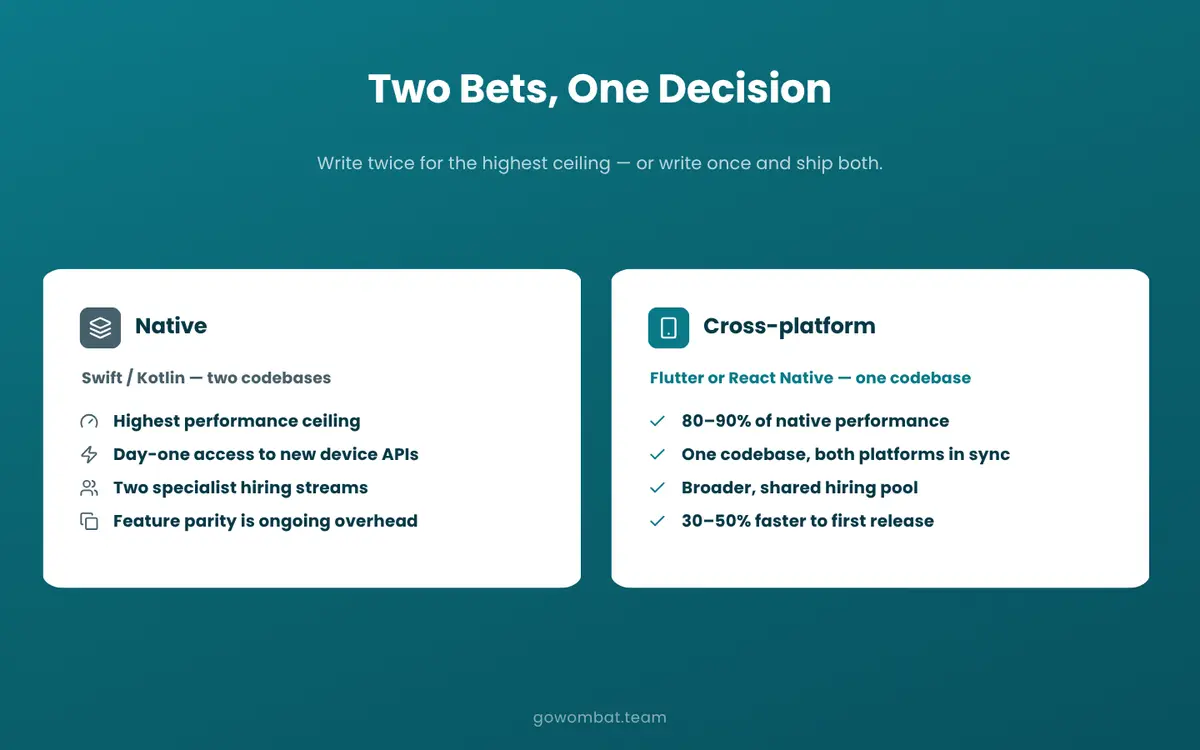
Native means writing the app twice: for iOS in Swift or Objective-C, and for Android in Kotlin or Java. The two codebases are compiled separately, and each calls the operating system's APIs directly. This is the oldest approach, and Apple and Google still design their developer tools around it.
Cross-platform frameworks work differently. Flutter (written in Dart) and React Native (written in JavaScript or TypeScript) let you write the app once and ship it to both platforms. The framework handles the layer between your code and the operating system: you give up some directness and gain shared effort.
The choice affects who you hire, how you organise releases, what maintenance costs in year three and how quickly you can adopt new platform features. It is hard to reverse once engineering is underway.
The case for native development
In some situations, native is the only sensible option.
Native apps can use every device API as soon as a new OS version ships, with no wrapper layer and no wait for a framework to add support. If Apple announces a new ARKit capability or Google ships a new camera API, your iOS or Android engineers can use it immediately.
Performance differences show up in three main areas: real-time 3D graphics and gaming, heavy sensor work (cameras, LiDAR, continuous GPS), and complex animations that must track gesture physics precisely. For most business applications, users will not notice the difference. For an augmented reality feature or a camera-based inspection workflow in manufacturing, they will.
Native tooling is also the first to support new design paradigms and hardware integrations. If your roadmap depends on adopting those changes early, native is the safer choice.
The cost: two codebases, two specialist skill sets to hire and retain (iOS and Android developers are rarely interchangeable), and two release pipelines with separate testing and store approval. Keeping features in sync across the platforms becomes an ongoing coordination task.
The case for cross-platform development
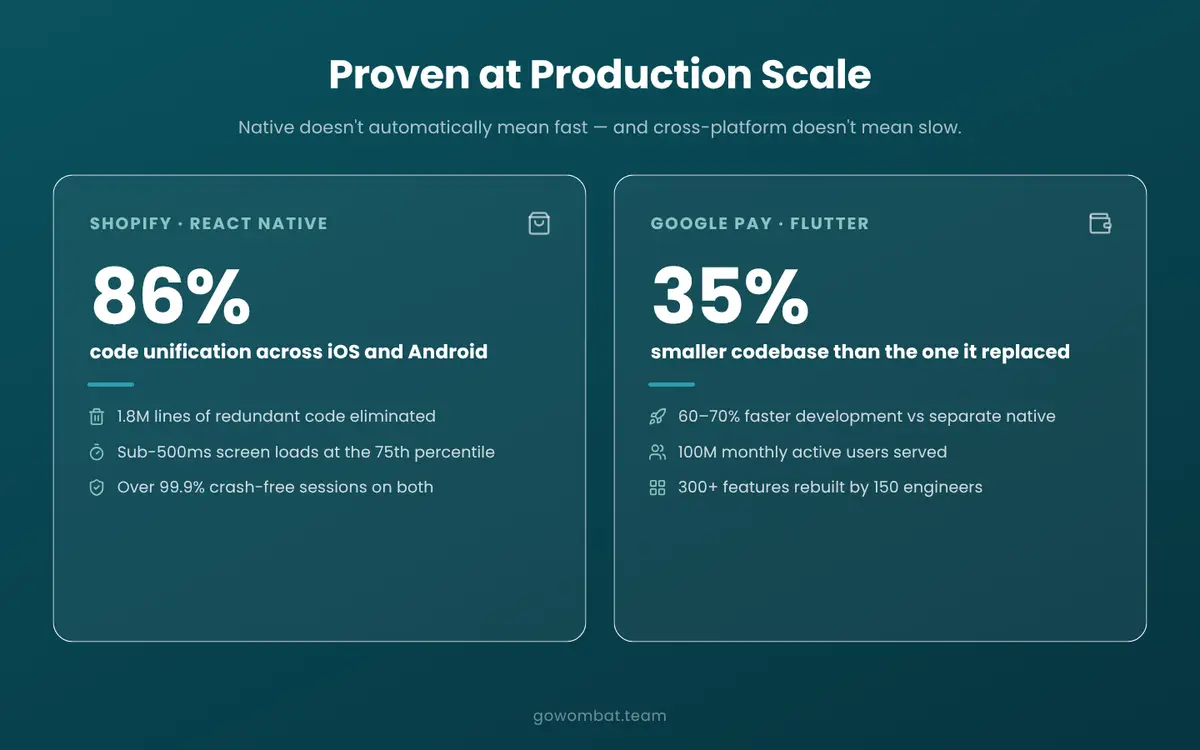
Shopify and Google Pay are the two most-cited examples.
Shopify completed its multi-year migration to React Native by late 2024. As reported in “Five years of React Native at Shopify”, the result was sub-500ms screen loads at the 75th percentile and over 99.9% crash-free sessions. Shopify's engineering team concluded that native does not automatically mean fast, and React Native does not automatically mean slow. In September 2026 Shopify announced a move back to native Swift and Kotlin, citing the cost of migrating to React Native’s New Architecture and AI coding agents that made rebuilding each platform affordable. The trade-off shifts with your tooling and roadmap.
Google Pay's Flutter migration covers different ground. A team that grew to about 180 engineers rebuilt an app with nearly 300 features for 100 million monthly active users. According to the Flutter showcase, the codebase shrank by 35% (from 1.7M to 1.1M lines) and engineering effort fell by about 70% compared to maintaining separate native codebases.
Both teams had unusually large engineering budgets, so their results show what is possible rather than what is typical. Still, for apps without heavy hardware interaction, cross-platform frameworks are mature enough that a shared codebase is often the better trade-off.
Teams without dedicated iOS and Android specialists can still ship a good app on both platforms, and teams that need both platforms in sync from day one avoid most of the coordination overhead.
Flutter vs React Native: the comparison within the choice
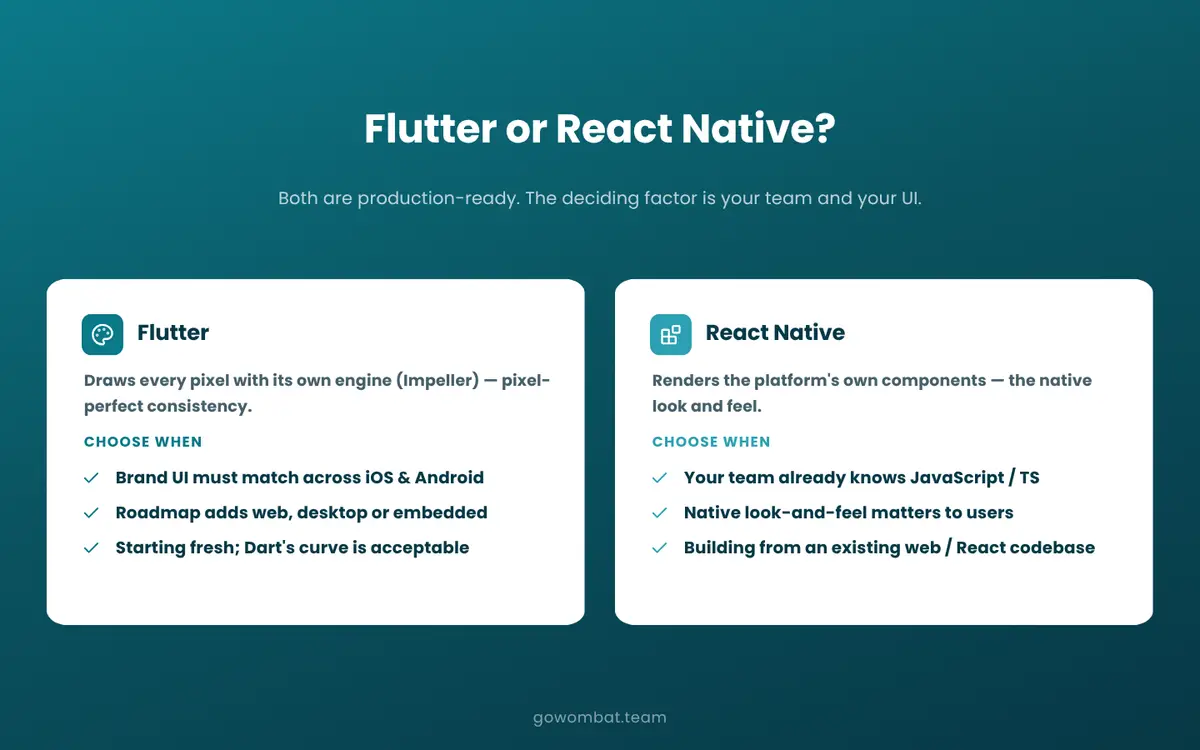
Choosing cross-platform still leaves a decision: Flutter and React Native are the two main options, and they work in different ways.
React Native uses the platform's own UI components. Your JavaScript logic runs on a separate thread and communicates with the native layer. When React Native renders a button, it renders the platform's button, so iOS users get the iOS feel and Android users the Android feel. The result can be indistinguishable from a natively written app.
Flutter ships its own rendering engine, Impeller, and draws every pixel itself. Impeller became the default renderer on iOS in Flutter 3.10 and on Android (API 29 and above) in Flutter 3.27. The UI is Flutter's, not the platform's: you get pixel-perfect consistency across iOS, Android and OS versions, but give up the automatic platform feel.
Signals that point toward Flutter:
- Brand UI consistency between iOS and Android is a hard product requirement
- Your roadmap includes web targets, desktop, or embedded platforms in the same codebase
- You are starting from scratch, and Dart's learning curve is acceptable to your team
Signals that point toward React Native:
- Your engineering team already knows JavaScript or TypeScript
- Native look-and-feel is important to your users
- You are building a mobile version of an existing website or integrating with a React or JavaScript codebase
Both are commercially healthy. In 2023 Google said more than one million published apps used Flutter, and both frameworks have large corporate backers (Google for Flutter, Meta for React Native) and regular stable releases.
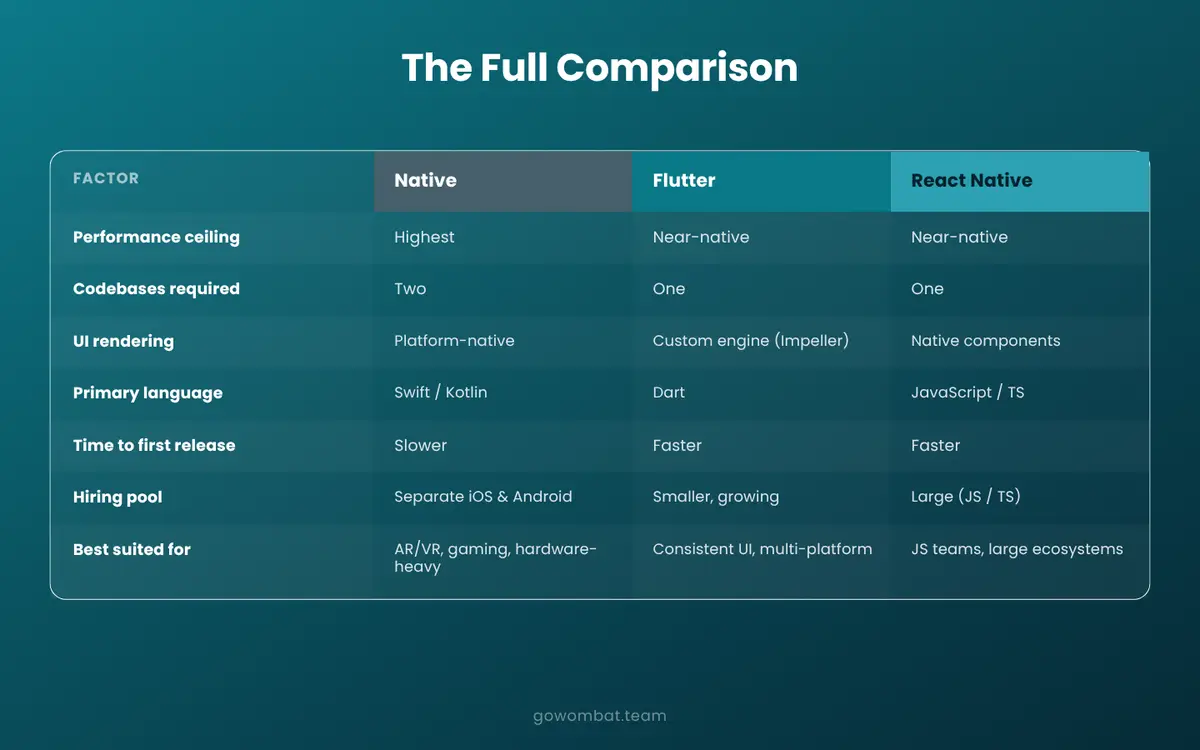
Side-by-side comparison
Factor | Native iOS/Android | Flutter | React Native |
|---|---|---|---|
Performance ceiling | Highest | Near-native | Near-native |
Codebases required | Two | One | One |
UI rendering | Platform-native | Custom (Impeller) | Native components |
Primary language | Swift / Kotlin | Dart | JS / TypeScript |
Time to first release | Slower | Faster | Faster |
Ecosystem maturity | Highest | Growing rapidly | Mature |
Hiring pool | Separate iOS & Android | Smaller, growing | Large (JS/TS devs) |
Best suited for | AR/VR, gaming, hardware | Consistent UI, multi-platform | JS teams, large ecosystems |
How to choose: a practical decision framework
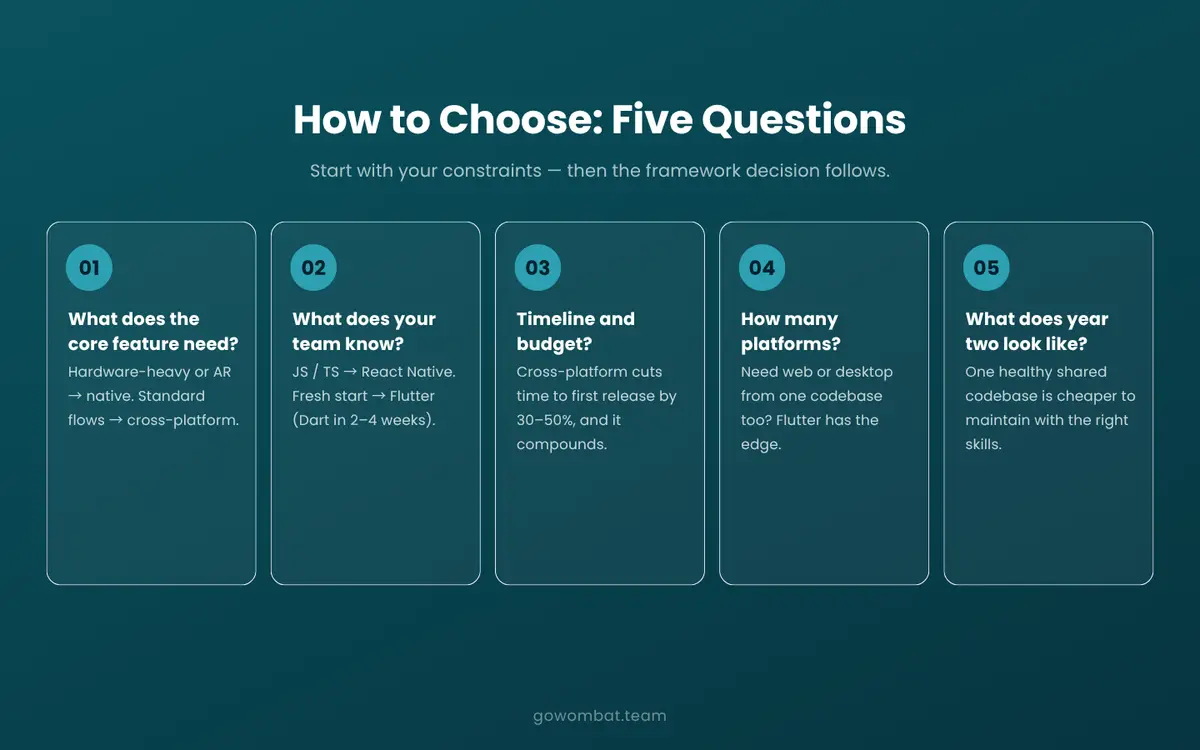
A common mistake is to pick a framework first and then check whether the requirements fit. Start with your constraints instead.
What does your app's core feature actually require?
Look at your core feature today, not the roadmap for version 3. For real-time 3D rendering, continuous LiDAR polling, augmented reality or complex GPU-driven animation, evaluate native first. For forms, dashboards, notifications, maps and standard transactional flows, cross-platform is a viable starting point. Most products fall into the second category.
What does your engineering team already know?
React Native suits teams with JavaScript or TypeScript experience. Flutter requires Dart, which is an onboarding cost for teams new to it. Native requires separate Swift and Kotlin specialists, which narrows the hiring pool and increases dependency on individual engineers. Your UI/UX design requirements matter too: Flutter's own rendering engine gives designers more precise control across platforms, which matters for brand-heavy products.
What is your timeline and budget?
Cross-platform usually shortens time to first release, because one team ships both platforms from one codebase, and the savings continue through maintenance. If you are building an MVP to validate the idea before a full build, a discovery phase will clarify the technical requirements and, with them, the framework choice.
How many platforms do you need?
iOS and Android are the baseline. If you also need web or desktop from the same codebase, Flutter has an advantage. For fintech and healthcare products that pair mobile apps with web portals, this can simplify the architecture.
What does year two look like?
A shared codebase is cheaper to maintain if your team has the right skills and the framework stays healthy. Both Flutter and React Native are actively maintained and commercially backed, but think about your team's long-term skills and your ongoing support and maintenance needs before committing.
Illustrative scenario (not a real client): a Scandinavian B2B SaaS company chose Flutter for its visual consistency and spent six months building a field-service application. Then the roadmap added a Bluetooth Low Energy integration with continuous high-frequency sensor polling. The feature shipped, but it needed a custom Flutter plugin and several weeks of unbudgeted debugging of native platform channels. Better software testing and requirements work at the start would have caught this before any code was written.
What the market looks like in 2026
Flutter powers nearly 30% of new free iOS apps, according to Apptopia data cited by Google at I/O 2025.
Native development is concentrating rather than declining. Premium consumer apps, games, products with medical device integrations and apps where OS-level design polish sets them apart are still built natively, or with native modules for the performance-critical paths. The backend development and frontend development layers rarely drive the framework decision; the mobile-specific features do.
Key takeaways
Native development gives you the highest performance ceiling and immediate access to new platform capabilities, at the cost of two codebases, two hiring streams and ongoing feature-parity work.
Cross-platform frameworks are fast enough for most commercial applications. Shopify reported near-native results with React Native, and Google Pay cut engineering effort with Flutter, although Shopify announced in September 2026 that it is moving back to native, mainly because of migration costs and AI-assisted development.
For most business applications, teams with JavaScript or TypeScript experience should evaluate React Native, and teams with pixel-consistency requirements or multi-platform plans should evaluate Flutter. Native remains the right answer for AR, real-time hardware interaction and consumer apps where OS-level polish is a real differentiator.
Map your technical requirements before choosing, and run a discovery phase if they are unclear.
Frequently asked questions
Is native development still worth it in 2026?
For specific use cases, yes. Apps with real-time AR/VR requirements, continuous hardware sensor processing or GPU-intensive rendering still benefit from native development in ways cross-platform frameworks cannot fully match. For most commercial business applications, cross-platform frameworks deliver comparable performance at lower build and maintenance cost. The deciding factor is what your app's core features require.
Flutter or React Native for a new project in 2026?
Neither is categorically better. Flutter fits better when brand-consistent UI across platforms is a must, or when the roadmap includes web and desktop targets in the same codebase. React Native makes more sense when your team already works in JavaScript or TypeScript, or when native look-and-feel matters to your users. Both are production-ready and commercially backed; the deciding factors are your team's skills and the app's requirements.
Can a cross-platform app match native performance?
For most commercial applications, yes. Shopify's React Native app delivered sub-500ms screen loads at the 75th percentile and over 99.9% crash-free sessions at production scale (Shopify has since decided, in 2026, to move back to native, mainly because of migration cost and AI-assisted development). Google Pay's Flutter app serves 100 million monthly active users. The remaining gap is in GPU-intensive work, real-time sensor processing and augmented reality, which make up a small share of commercial mobile builds.
What should a healthcare or fintech company consider when choosing?
Regulated industries add a compliance layer on top of the technical considerations. Healthcare mobile applications that integrate with medical devices or require continuous clinical data streams may need native modules for specific components, even when the broader app is cross-platform. For fintech products, the primary considerations are typically security architecture, API integration patterns, and regulatory requirements rather than the mobile framework itself. For a production example, see our Epsilon case study and our guide to building a mobile application.
How much cheaper is cross-platform development compared to native?
It depends on the app. One shared codebase usually means one team and one release pipeline instead of two, and Google Pay reported about 70% less engineering effort after moving to Flutter, but results vary. A discovery phase engagement is the most reliable way to scope costs before you commit to a direction.
Share and subscribe to our blog
Related articles

PHP vs Python
PHP vs Python: how the two backend languages compare on popularity, performance, frameworks, security and debugging.

Python - The Best Programming Language for AI and ML
Why Python suits AI and machine learning: readable code, mature libraries, portability and a large community, with examples from fintech, transport, healthcare and our own projects.

How to Build a Successful Mobile Application
How to build a successful mobile app, step by step: validate the problem, research the market, plan an MVP, choose how to build it, launch and improve.

How to Create a Mobile App from a Website
When a website needs a mobile app, how native and cross-platform apps compare, a React Native project of ours, and the steps to convert a website into an app.

How can we help you?